Free receipt maker
for the payments you receive

Write who paid you, how much, what it was for and how they paid, and the receipt is ready to print with a line for your signature. It opens on the receipt, with no account and no receipt book.

From

One detail per line

Received from
Amount

Payment terms, bank details, delivery time

Your data stays in this browser and is never sent to a server.

Document preview

Maple Lane Design

48 Harbor Street, Suite 3 Portland, ME 04101 hello@example.com

Receipt

Number:
RCT-0001
Date:
Received from
Bluebird Bakery
Amount
$1,455.00
Payment for
50% deposit on the website redesign
Payment method
Bank transfer

Terms and notes

Payment due within 14 days by bank transfer or card. Thank you for your business.

Signature
Want every payment on record?

Turn this receipt maker into an app of your own: each payment you record gets the next receipt number, is linked to its invoice, and updates what the client still owes. It starts from the Invoices starting point, and you keep changing it by asking in plain English.

Turn it into my app

What the app adds to the receipt maker

A receipt for every payment

Record a payment and the receipt is made for you, with the next number in its own series (RCT-0001, RCT-0002).

Linked to the invoice

A payment against an invoice moves it to partly paid or paid, and the invoice shows the balance still due.

Receipts on their own too

A deposit, a cash sale or a payment with no invoice gets a receipt of its own, with what it was for.

Share it with the payer

Download the PDF, print it, or share a link the client opens without an account. The WhatsApp button opens a chat with the link ready to send.

Who paid what, and how

Every payment with its date and method, per client, so you can answer "did they pay?" in seconds.

Fits how you get paid

Ask for it in a sentence: your payment methods, a thank-you line on every receipt, a monthly list of payments for your accountant.

What receipts look like in the app

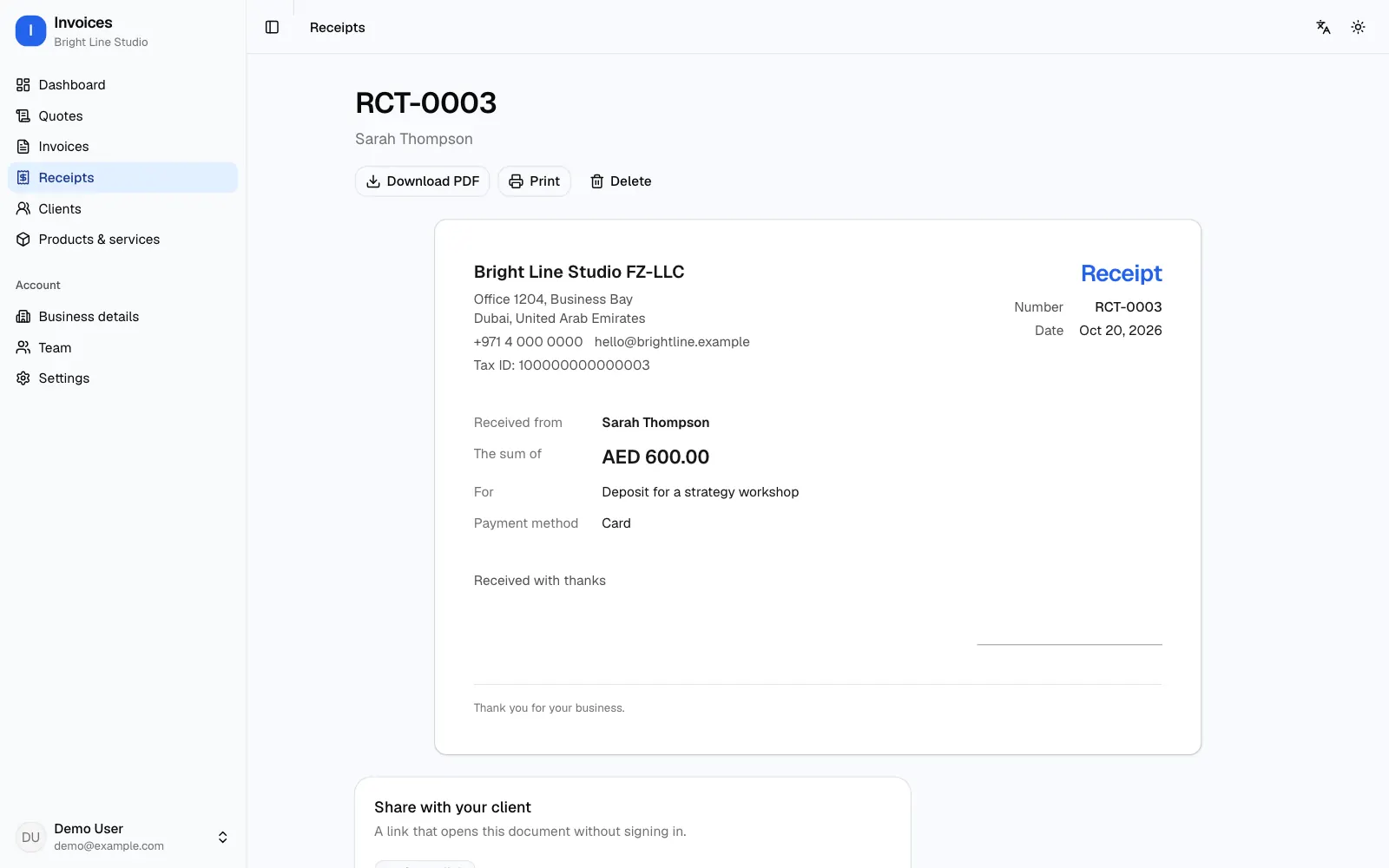
Receipt maker app: receipt RCT-0003 received from Sarah Thompson for a strategy workshop deposit paid by card, with a signature line
Receipt RCT-0003 for a card deposit, with Download PDF, Print and a link to share it with the client

From the receipt maker to your own app in 3 steps

  1. 1

    Start from this page

    Click "Turn it into my app". The Invoices starting point is picked, and your first message already asks for payments and numbered receipts.

  2. 2

    Record a real payment

    Refinar builds the app with sign-in and a real database in about a minute. Make an invoice in the live preview, record a part payment, and see the receipt and the balance.

  3. 3

    Change it by asking, then launch

    Ask for what your business needs in plain sentences. When you launch, the code and the database are yours, and Refinar hosts the app.

What a payment receipt should show

A receipt is proof that money changed hands, so it needs to stand on its own if anyone asks later. Put your name or business name and contact at the top, a receipt number and the date, then who paid you, the amount and currency, what the payment was for, and how it was paid: cash, card, bank transfer or cheque.

If the payment is a deposit or one part of a larger bill, say so in "Payment for" and mention the quote or invoice number, so both of you can match it later. Sign it, especially for cash. The receipt maker above has each of these fields; it does not list items or tax lines, which belong on the invoice.

Deposits and part payments

When a client pays half up front, give them a receipt for that half straight away, naming the job. When the rest arrives, give a second receipt and, if you sent an invoice, check that the two add up to its total.

That matching is the tedious part on paper. In your own app every payment is recorded against its invoice, so the invoice shows partly paid and the balance due until the last payment lands.

A receipt, an invoice or a quote?

A receipt confirms you were paid. An invoice asks to be paid, and a quote states a price before the work. The same generator makes all three: the free invoice generator opens on the invoice, and the quote template on the quote.

Make receipts only for payments you really received. A receipt for money that never changed hands, or a copy of another shop's receipt, is not what this tool is for.

Questions about receipts

How do I make a receipt for a payment?

Fill in your details, who paid, the amount, what it was for and the payment method. The number and today's date are filled in for you. Then click "Download PDF or print", choose "Save as PDF", and send the file or hand over the printed copy with your signature.

Can the receipt list items and tax?

No. This is a payment receipt: who paid, how much and what for. For a list of items with tax, make an invoice from the same details and mark it paid, or in your own app ask for a sales receipt with item lines.

Does a receipt need a number?

It should have one, in order, so each payment can be told apart and matched to its invoice. The receipt maker starts the number with RCT- and you can change it. In the app, numbers are given for you and never repeat.

Is the receipt maker free? Do I need an account?

It is free and needs no account. What you type stays in this browser and is never sent to a server, so you can come back to a receipt you started.

What happens when I turn it into my app?

You create a Refinar account, and it builds an app from the Invoices starting point that records payments and keeps receipts, invoices and clients in a database. Building and changing it uses credits from your plan; prices are on the pricing page. For a different app, describe it to the AI app builder.

More ready-made apps