Free quote template
for a price quote you send as a PDF

Add what the job includes and the price of each part, set how long the price holds, and the total with discount and tax is worked out for you. It opens on the quote, with a line at the bottom for the client to accept.

From

One detail per line

Bill to
Items and services

Payment terms, bank details, delivery time

Your data stays in this browser and is never sent to a server.

Document preview

Maple Lane Design

48 Harbor Street, Suite 3 Portland, ME 04101 hello@example.com

Quote

Number:
QUO-0001
Date:
Valid until:

Bill to

Bluebird Bakery

210 Congress Street Portland, ME 04101

DescriptionQtyUnit priceAmount
Website redesign, five pages1$2,400.00$2,400.00
Product photography (hours)6$85.00$510.00
Subtotal
$2,910.00
Total
$2,910.00

Terms and notes

Price includes design, build and two rounds of changes. Hosting and photography are not included. 50% deposit on acceptance, balance on delivery. Work starts within one week of acceptance.

Accepted by: name, signature and date
Want to know which quotes were accepted?

Turn this template into an app of your own that keeps every quote you sent and where it stands, turns the accepted one into an invoice without retyping the lines, and remembers your clients and your prices. It starts from the Invoices starting point, and you keep changing it by asking in plain English.

Turn it into my app

What the app adds to the template

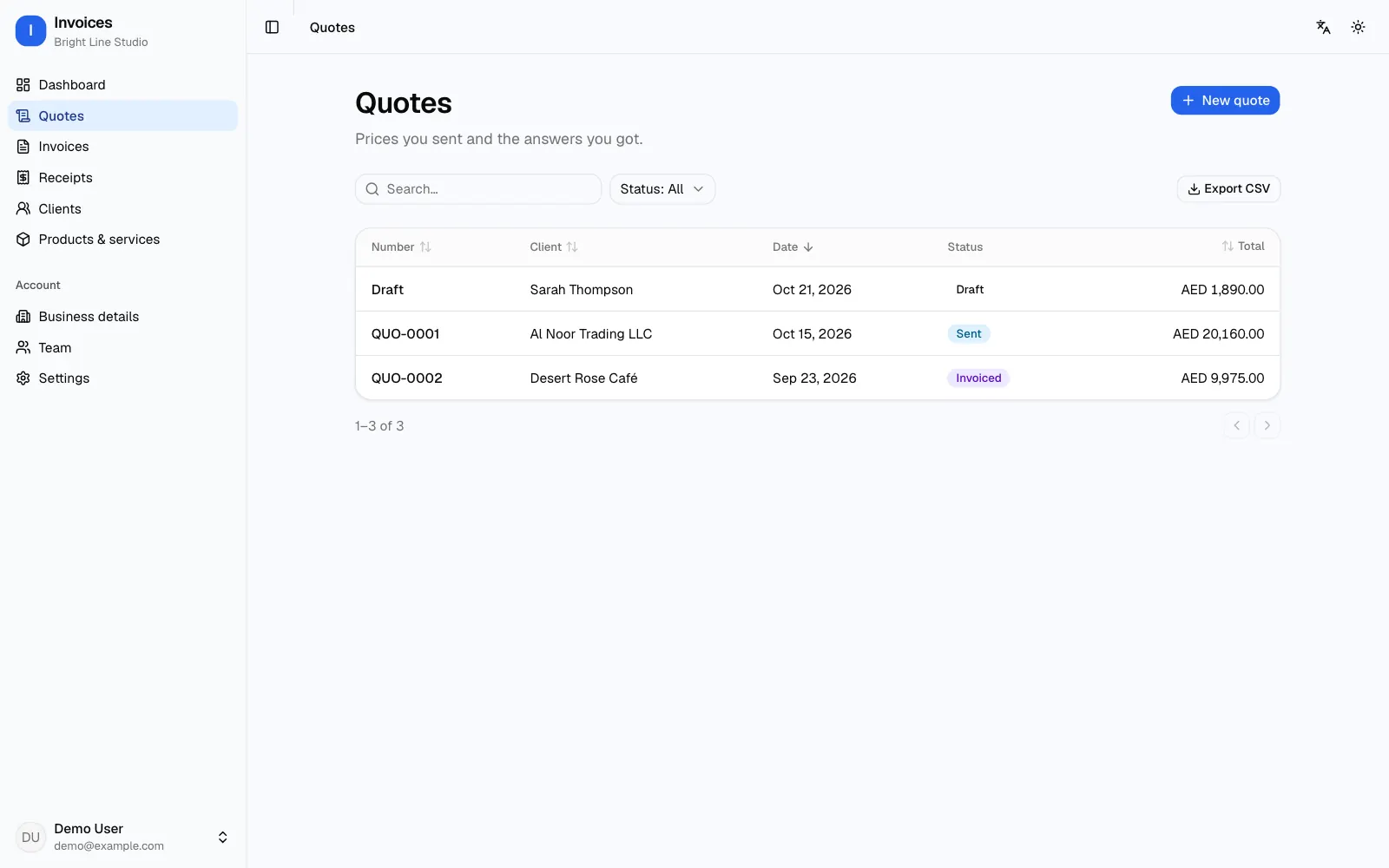
Every quote in one list

Number, client, total and status for each quote. Once the valid-until date passes, a sent quote with no answer shows as expired, so you know which ones to chase.

From quote to invoice

When the client accepts, the lines, prices and discount move to a new invoice. Nothing is typed twice, and the invoice links back to its quote.

Your prices, saved

A catalogue of your products and services with their prices, to pick quote lines from instead of typing them each time.

Numbers of their own

Quotes count on their own (QUO-0001, QUO-0002), apart from invoices, so the two never get mixed up.

Each client's history

What you quoted each client, what they accepted, what became an invoice and what they have paid.

Fits how you quote

Ask for it in a sentence: standard terms on every quote, a deposit line, a manager's approval before a quote goes out.

What quotes look like in the app

Quote template turned into an app: a list of three quotes with number, client, date, status and total, and a New quote button
The quotes list: a draft, a sent quote waiting for an answer, and one already invoiced

From the template to your own app in 3 steps

  1. 1

    Start from this page

    Click "Turn it into my app". The Invoices starting point is picked, and your first message already asks for quotes with statuses that turn into invoices.

  2. 2

    Try a real quote

    Refinar builds the app with sign-in and a real database in about a minute. Make your first quote in the live preview and turn it into an invoice to see the whole path.

  3. 3

    Add your terms, then launch

    Ask for what your business needs, such as a default validity or fixed payment terms. When you launch, the code and the database are yours, and Refinar hosts the app.

What a quote should include

A quote is a written promise of a price for a piece of work, and the clearer it is, the fewer arguments after the client says yes. Start with your details and the client's, a quote number and the date: clients usually reply by quoting the number back.

Then the lines: each product or service, the quantity, the unit price and the amount, followed by the subtotal, any discount, tax if you charge it, and the total. In the notes, say what the price includes and what it does not, how long the work takes, and how you want to be paid, including any deposit. The template above has a field for each and works out the totals.

Quote, estimate or quotation?

"Quote" and "quotation" are the same document. An estimate is usually looser: a best guess that can change once the work starts. If your price is fixed, call it a quote and say what it covers; if it may move, call it an estimate and say what could change it.

The document heading here reads "Quote". For an estimate, write it in the notes, or in your own app ask for an Estimate type with its own numbers.

How long a quote stays valid

Materials, shipping and labour costs change, so every quote carries a valid-until date. Write a real date rather than "for a limited time": it settles the question when a client comes back two months later asking for the old price.

Between one week and 30 days is common: shorter for goods whose prices move, longer for services whose cost you know. The template sets the date 15 days after the quote date; change it as you like.

From quote to invoice

A quote does not ask for payment. Once the client accepts, send an invoice with the same lines, ideally mentioning the quote it came from. If you asked for a deposit, give a receipt for it.

Here, switch the document type from Quote to Invoice: the lines stay, and the heading and number change. Each document has its own page too: the free invoice generator for after the yes, and the receipt maker for every payment you receive.

Questions about quotes

How do I write a professional quote?

Put your details and the client's, a quote number, the date and a valid-until date, then the lines with quantities, prices and the total with tax. In the notes, say what the price includes, how long the work takes and your payment terms, and sign it. Short sentences and clear numbers are enough.

Is a quote legally binding?

It is generally read as an offer: if the client accepts it while it is valid, you are expected to honour the price. That is why the dates and terms matter. For larger jobs, have the client sign the acceptance line or sign a contract. This is general information, not legal advice.

Should a quote include tax?

If you are registered for VAT, GST or sales tax, show the subtotal, the tax and the total, so the client knows what they will really pay. The tax starts at 0%; set your rate and it is added.

How do I send the quote as a PDF?

Click "Download PDF or print" and choose "Save as PDF" instead of a printer, then attach the file to an email or a message. It works on a phone and a computer, and the quote stays as a draft in your browser until you start a new document.

Is the quote template free? What happens if I turn it into an app?

The template is free and needs no account, and what you type stays in your browser. If you turn it into an app, you create a Refinar account and it builds an app that keeps your quotes and clients in a database. Building and changing it uses credits from your plan; details are on the pricing page. For a different app, describe it to the AI app builder.

More ready-made apps