platform transition · 5 min read
Figma Make Alternatives for Your Production Codebase (2026)
Figma Make can now edit your real codebase, in a Mac-only closed beta. Five alternatives that change an existing repo today, and where each one runs your app.
Updated 2026-09-22
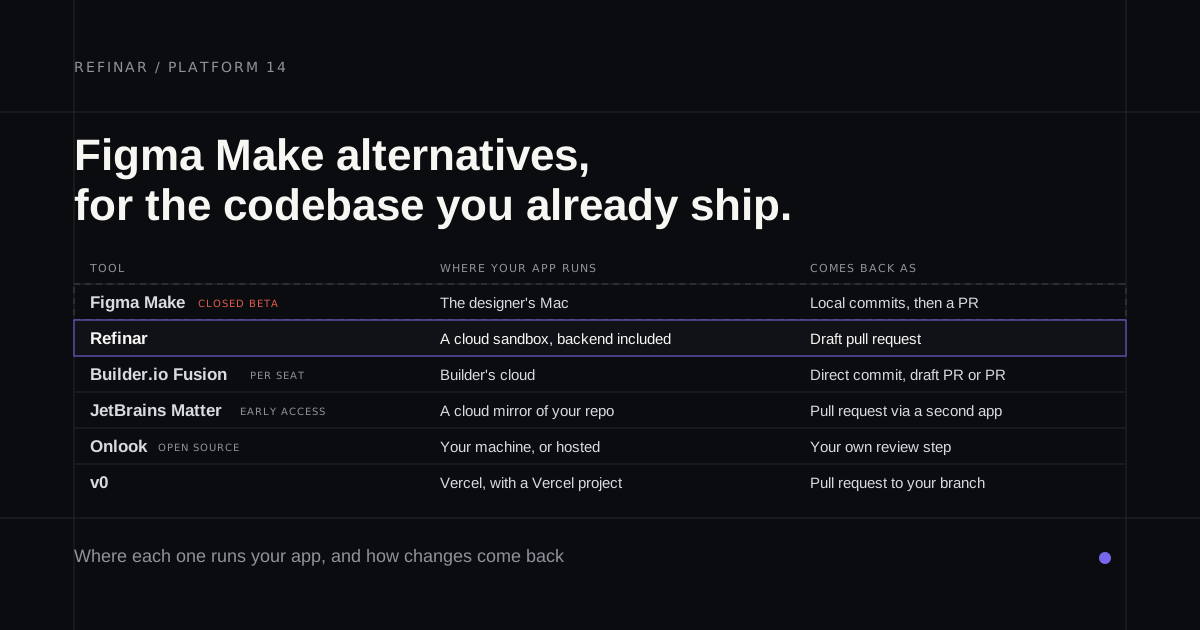
If you design in Figma and you've watched engineers rebuild your frames by hand for years, Make's codebase mode is the feature you've been waiting for. Since May 2026, Make in your local codebase can open your team's real app, let you change it with a properties panel, annotations or chat, and send the result to engineering as a pull request.
The catch is getting in. It's a closed beta, and plenty of teams on the waitlist are still waiting. Here's what Make does with a codebase, where it stops, and what you can use in the meantime.
What Make does with a codebase
Everything happens on your Mac. You open a local folder or clone a repository, and Make writes config into .figma/make so it knows how to install and run the project. Once the app is up, you select an element and change its layout, colour, type or spacing, stack annotations to queue several edits, or ask in chat. Edits sit as local commits until you create a branch and open a pull request.
GitHub gets the full treatment through a Figma GitHub App your org admin installs, though GitHub Enterprise Server isn't supported. GitLab and Bitbucket connect over SSH, and on those you open the pull request in the provider's own interface.
Why teams look elsewhere
You might not get in. It's Mac only, in the Figma Beta desktop app, on Professional, Organization and Enterprise plans. Access goes out in waves by organisation, and Figma's launch post says joining the waitlist doesn't guarantee a place. It's free for now. Seat requirements and credit pricing haven't been announced.
Your laptop becomes the dev environment. The repo is cloned onto the designer's machine, so they need access to it and Make has to be able to run it there. Figma's troubleshooting guide says a repository may need a one-time setup from an engineer, and names SSH setup for GitLab and Bitbucket as the most common first blocker for designers.
It's for frontends. Make handles any web framework, with React, Vue and Svelte verified. Figma says the beta isn't meant for backend work, infrastructure, native mobile or non-web code.
The config lives in git. Figma recommends committing .figma/make to main so every branch picks it up.
Refinar
Best for: a PM or designer who wants the same loop with nothing set up locally.
Nothing runs on your laptop. You connect a repository through our GitHub App (connect your app to GitHub), and we boot the app in a cloud sandbox, backend included. A designer opens a browser tab and works on the live app, then shares it for review when it's ready.
Changes arrive as a draft pull request on their own branch, and no config files land in your repo. Frontends on Next, Vite, Astro, Nuxt or Angular work, and so do apps served by Laravel, Django, Rails, Go or Rust.
You won't get Make's properties panel. Refinar is prompt-first: you describe the change and check the result in the preview. It's also GitHub only. What you get in return are guard rails for a product people are using. Database and payment connections stay read-only until someone approves a write, and anything touching sign-in or customer data waits for a developer. It costs from $50 a month, and every plan covers 20 teammates (pricing). We make Refinar, so judge it on your own repo.
Builder.io Fusion
Best for: a design team that wants a canvas today, on React, Vue, Svelte or Angular.
Of everything here, Fusion feels most like Make. It's a visual editor on your running app, but it's generally available, it runs in Builder's cloud rather than on your Mac, and it takes GitLab, Bitbucket and Azure DevOps as well as GitHub. Pricing is per seat ($24 per user a month on Pro, $40 on Team) plus agent credits, and it adds a .builderrules file to the repo. Builder.io Fusion alternatives covers the trade-offs.
JetBrains Matter
Best for: a frontend team comfortable on another early access list.
Matter works on a mirror of your repository in JetBrains' cloud. PMs and designers prompt changes, reference Figma frames and hand off a GitHub pull request. It's free, its preview needs a frontend dev server, and the whole thing sits under early access terms JetBrains can end whenever it chooses. More in JetBrains Matter alternatives.
Onlook
Best for: a designer who wants an open-source canvas on a React app.
Closest to Make in spirit: click an element, change it, and the code changes underneath. Onlook is Apache 2.0, runs locally or hosted, and works best on Next.js with Tailwind. Its hosted version has a waitlist of its own, and the site doesn't describe how changes become a pull request.
v0
Best for: a Next.js app on Vercel.
v0 can take an existing repository and open a pull request against the branch you pick. It expects a Vercel project, and previews see Development variables only, so it suits teams already deploying there (the details).
Which one should you pick?
- Not in the beta, or not on a Mac: Builder.io Fusion if you want a canvas, Refinar if you'd rather set nothing up locally.
- The app has a backend you'll need to touch: Refinar.
- Free and early access is fine: JetBrains Matter.
- Open source matters: Onlook.
- Next.js on Vercel: v0.
- You're in, you're on a Mac, and the frontend lives on GitHub: stay on Make. Nothing else here puts your design file and your code in one window.
Once designers are opening pull requests, the team needs rules for who approves what. How product managers can safely make changes to a production app lays them out.
If the waitlist is where you're stuck, connect a repo to Refinar and ask for the change you'd have made in Make. I read what comes into support, so tell me where it falls short.