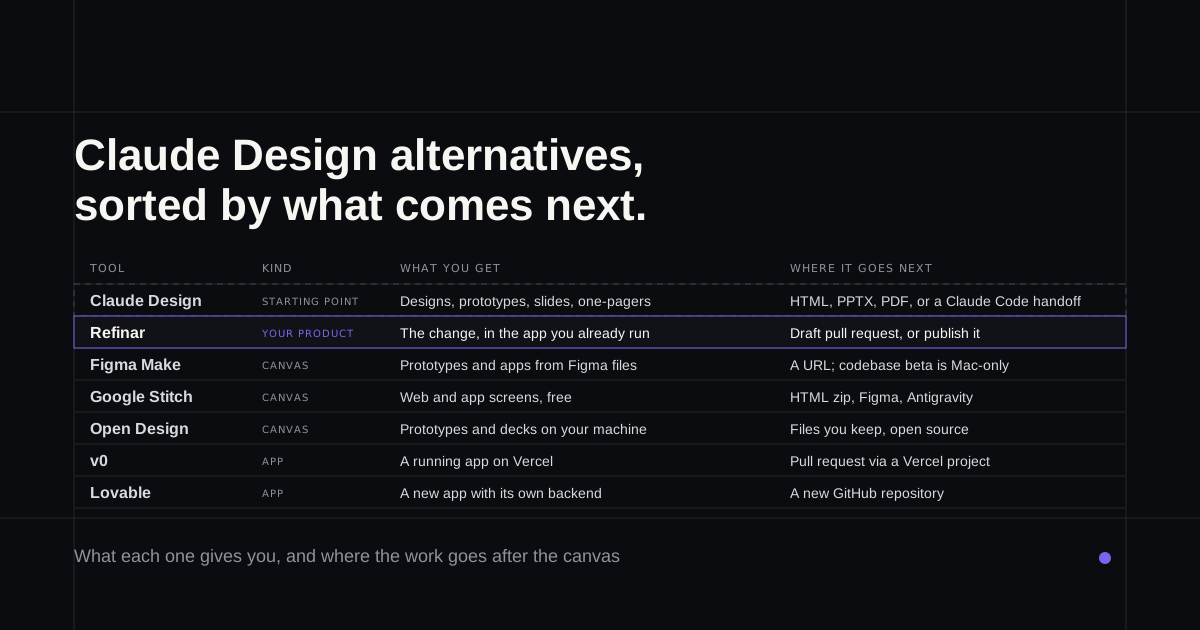
You asked Claude Design for a flow, it came back looking like your product, and the team liked it. Now it lives in a canvas tab. Most people looking for a Claude Design alternative at this point want one of two things: a different canvas to keep exploring in, or the screen they prototyped running inside the app customers already log into. This list is sorted by which of those you need.
What Claude Design does, and where it hands off
Anthropic Labs launched Claude Design on 17 April 2026. You describe what you want and it builds designs, interactive prototypes, slides or one-pagers on a canvas beside the chat. Point it at a GitHub repository or your design files and it builds a design system from them, so new work uses your real colours and components. It's in beta on Claude's paid plans and draws on the same usage allowance as the rest of Claude.
Anthropic's getting started guide lists the exports as a .zip, PDF, PPTX or standalone HTML, plus sending the project to Canva, v0, Lovable and twelve more. Figma isn't on the list. The main road to code is a handoff bundle for Claude Code, a coding agent that works inside a repository, and the guide admits there's no version history yet. What designers do on the Claude Code side is its own subject, covered in Claude Code for designers.
Claude Design alternatives at a glance
| What you need next | Try |
|---|---|
| The change made in the product you already run | Refinar |
| A canvas that reads your Figma library | Figma Make |
| Free app screens you can take into Figma | Google Stitch |
| A canvas on your own machine and model | Open Design |
| The prototype as a running app on Vercel | v0 |
| The prototype as a brand new app with a backend | Lovable |
Facts below were checked on each vendor's own pages on 4 October 2026.
Refinar
Best for: a PM or founder with an approved prototype who wants it built into the app customers already use.
Every other tool here ends with something that sits beside your product. Refinar starts from the product. You connect the GitHub repository of the app you already run, Refinar runs it in a cloud sandbox, and the preview you work in is the app itself.
Describe the screen you prototyped, or point at the spot on the preview where it belongs, and a coding agent builds it while you watch. You can step back from any change until it's published. Anything involving sign-in, payments or customer data stays unpublished: the agent does the safe part, and the rest goes to your developer with notes, or to one of Refinar's developers within four hours on a working day if you don't have one. Approved work ships as a draft pull request or goes live when you publish.
It isn't a canvas, so you won't explore a dozen directions or export a deck here. It needs GitHub, and it doesn't create apps from nothing (Refinar's Foundation build covers that).
Figma Make
Best for: a team whose designs and component library already live in Figma.
Make is Figma's prompt-to-app tool. You attach frames and components from your files, iterate in chat or with a Figma-style properties panel, and publish the result to its own URL. It comes with a Full seat on a paid plan, and the free Starter plan lets you try it without team libraries for style context, per Figma's Make FAQs.
So, Claude Design vs Figma? If your source of truth is a Figma library, Make reads it natively and keeps the version history Claude Design lacks. If the truth is in your code, Claude Design reads that directly and covers decks and one-pagers too. Make's weak spot is a real codebase, which is still a Mac-only closed beta behind a waitlist. Figma Make alternatives for your production codebase covers that beta.
Google Stitch
Best for: exploring web and mobile app screens without paying anything.
Stitch is Google Labs' AI design canvas, still badged beta. It turns a prompt or an image into web and app screens and links them into a clickable prototype. Brand rules live in DESIGN.md, a format Google open-sourced in April. Screens download as a zip of HTML and images, and Fast mode is the one meant for Figma export. Since Google I/O in May it can take a codebase as context and send screens on to Antigravity, Google's coding tool.
Google doesn't charge for it. You sign in with a Google account and spend daily credits, which the Stitch team says on Google's developer forum reset at midnight UTC. The same forum has threads about credits stuck at zero and Figma exports hitting a limit.
Stitch vs Claude Design comes down to scope and cost. Stitch is free and exports to Figma; Claude Design needs a paid plan and in return covers slides and learns your design system from the repo. If you came looking for a Google Stitch alternative, the rest of this list works for you too.
Open Design
Best for: a designer who wants the canvas on their own machine, running the model of their choice.
Open Design bills itself as the open-source Claude Design alternative, and it caught on fast. Its GitHub repository was created on 28 April 2026 and had about 99,000 stars by 4 October. It's Apache 2.0, with desktop apps for macOS and Windows.
It has no model of its own. It drives a coding agent you already have installed, or an API key you paste in, and saves prototypes and decks as files you keep. The cost is convenience: you pay your own model bills, the output is only as good as the agent behind it, and the README says scrubbed safety telemetry stays on even with analytics off.
v0
Best for: turning the prototype into a running app on Vercel, or a pull request against a repo that deploys there.
Claude Design can send a project straight to v0, and what comes back is a working app with a Design Mode for visual tweaks. v0 also imports a GitHub repository you already have, makes changes on a working branch inside a Vercel Sandbox and publishes through a pull request (how v0 handles an existing repo).
Everything routes through a Vercel project, and the preview only sees that project's Development environment variables, so anything needing production keys won't run there. Free allows 7 messages a day, and paid plans start at $30 per user a month (v0 pricing).
Lovable
Best for: a founder whose prototype is the product, and who wants it built as a new app.
Lovable is another of Claude Design's send-to targets, and it builds the whole app around the design, hosting it on its own backend with a database and sign-in, and syncing the code to a new GitHub repository. For a first version that's a quick road.
For an app you already run, it's the wrong one. Lovable's GitHub docs answer the question of importing an existing repository with a flat no. Lovable alternatives that open an app you already have pick up from there, and if building by prompt is new to you, how to vibe code covers the habits that keep it on track.
If you mostly use Claude Design for decks and one-pagers, only Open Design covers that here, so keep both. And once the prototype is signed off, try Refinar on your app with the first screen from the canvas.