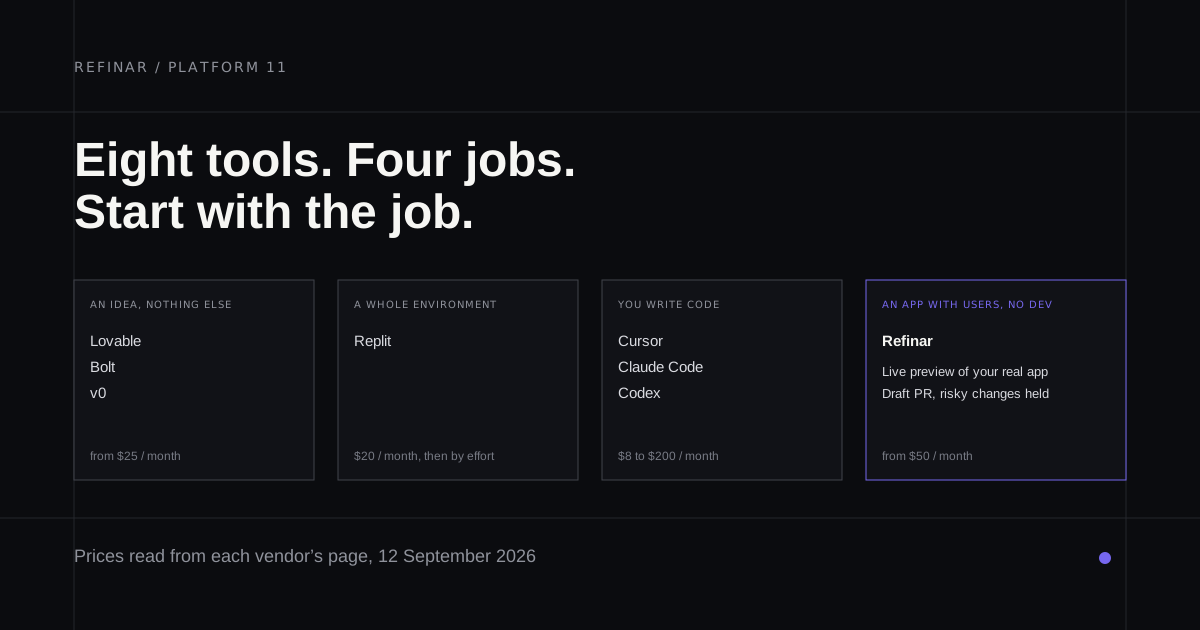
Andrej Karpathy coined "vibe coding" in a post on X on 2 February 2025, and Collins named it Word of the Year for 2025. Since then every kind of person has a vibe coding platform aimed at them, which is why a ranked top ten doesn't help much. A founder with a sketch and an engineer with a monorepo aren't shopping for the same app.
So this list is grouped by what you walk in with, starting with the job most roundups leave out, an app that already has users. Each entry also says how the tool charges once you're past the headline price, because nearly all of them now bill by usage in some form.
The app already exists and you don't write code
Refinar
Best for: a product owner changing a live app on GitHub, with a developer approving the risky parts.
Refinar is on this list for the app you already have. It opens the repository your app lives in and gets it running on a cloud sandbox. From there you describe a change in plain words, or click the spot in the preview you mean, and watch the agent make it. A developer has the last word through a draft pull request, and Refinar won't publish anything that touches logins, payments or customer data on its own. Billing is per request, with $25 a month covering about 50 and 20 teammates included. Credits you don't spend carry over for as long as the plan stays active (pricing).
You have an idea and nothing else
Haven't started yet? Refinar's builder turns a written description into a first version with sign-in and its own database, and from then on it changes like any other app there. To learn the process by hand first, how to vibe code follows one small app from spec to launch.
Lovable
Best for: a polished first version from a blank page.
The free plan gives 5 build credits a day, capped at 30 a month. Pro starts at $25 a month (September 2026) with unlimited members, handy once a co-founder wants in. The thing to understand is Build mode. Lovable's credit docs price it by how complex the request is and the work done, so the same plan buys very different amounts of progress. Plan mode costs one credit per message, which makes it the cheap place to think. Lovable pricing breaks the plans down.
Bolt
Best for: a live URL the same afternoon, as long as it's JavaScript.
Free allows 300K tokens a day and 1M a month, and Pro is $25 a month at the time of writing. Bolt's token docs are unusually direct about where tokens go. Most are spent reading and syncing your project files, so every message costs more as the project grows. When the daily cap runs out, edits you make by hand in Code view are still free. The backend has to be Node.
Base44
Best for: a founder who wants the backend handled for them.
Base44 runs a managed backend with a database, sign-in, backend functions and hosting, so there's nothing to wire up on day one. Free includes 25 message credits a month. Starter is $20, Builder $50, Pro $100 and Elite $200 a month on its pricing page today, with 20% off yearly (what those credits buy). The catch comes later. Code synced to GitHub still calls Base44 through @base44/sdk, and your data models stay managed in Base44, so leaving is developer work. Wix bought it in June 2025, and the Base44 alternatives post covers the exit.
v0
Best for: a Next.js front end that will live on Vercel.
Free costs nothing, and Plus was $30 a seat each month in September. Of the builders, v0 behaves most like a colleague who writes code, keeping its work on a branch and publishing through a pull request that your branch protection still governs. It assumes Vercel for previews and deployments. Host elsewhere and that's a second platform to keep alive.
You want the whole stack in one place
Replit
Best for: an app whose backend and hosting live under one login.
Starter is free and Core is $20 a month at the time of writing. Agent's Free Mode covers everyday work within your plan's allowance, while the paid Power and Max modes use effort-based pricing that grows with how complex the request is. Replit asks before a paid action starts, which helps, and you can set a monthly usage limit in account settings. Do that on the first day, not after the first invoice.
You write code
Cursor
Best for: working in an editor with an agent beside you.
Hobby is free, Individual is $20 a month and Teams is $40 per user (September 2026). The line to watch is Cloud Agents, which Cursor used to call background agents. They're billed at API pricing for whichever model you pick, and Cursor asks for a spend limit the first time you use them.
Claude Code
Best for: delegating a bounded, difficult task.
Anthropic's agentic coding tool works through your codebase and runs commands as it goes, from the terminal, VS Code, Cursor, JetBrains, a desktop app or the web at claude.ai/code, and it can open pull requests. It isn't on Claude's Free plan. Pro is currently $20 a month ($17 billed yearly) and Max starts at $100. Cloud sessions count against the same rate limits as everything else you do in Claude, so a long afternoon of chat comes out of the same allowance.
Codex
Best for: sending tasks to the cloud if you already pay for ChatGPT.
Codex cloud currently comes with ChatGPT Plus at $20 a month, and Pro starts at $100 with five or twenty times the usage. Free and Go ($8) get a limited version in the desktop app. Local and cloud tasks draw on one allowance. In the cloud, the agent's internet access is off by default once setup finishes, so anything a task needs has to be installed by the setup script. More on that in what background coding agents do.
Which one
- A live app on GitHub and no developer free to change it: Refinar.
- A sketch and no code: Lovable for polish, or Bolt for speed.
- No appetite for backend work: Base44.
- A Next.js front end headed for Vercel: v0.
- Backend and hosting in one place: Replit.
- You write code: Cursor to edit, then Claude Code or Codex to delegate.
These tools differ far more once the app exists, which is what AI web app builders compared on existing apps tests, and is vibe coding safe is worth answering before any of them touches production.
If something you vibe coded is now the thing customers log into, give Refinar its repository and make the next change there.