platform transition · 5 min read
Builder.io Fusion Alternatives for the App You Already Have (2026)
Fusion puts a visual AI editor on your repo, for four frameworks at per-seat prices. The alternatives that open an existing codebase, and what each changes in it.
Updated 2026-09-22
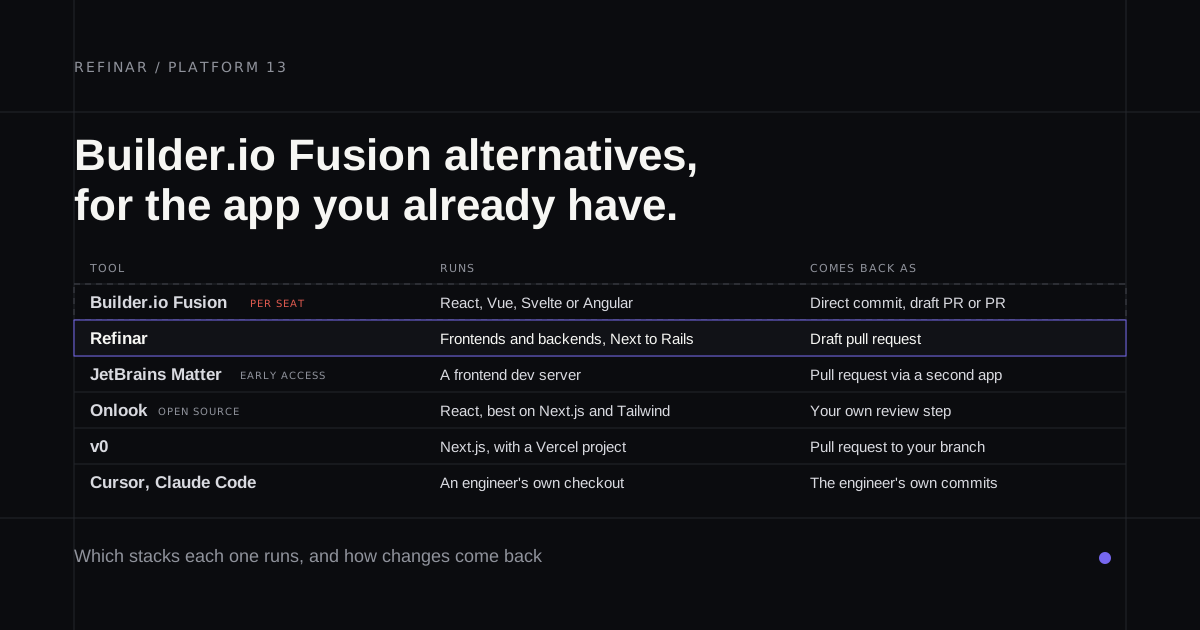
You've probably tried Fusion already, or you're weighing it up. It does something most AI builders don't: it opens the app your team already runs, lets a designer change it on a canvas, and hands engineering a pull request. If you searched "Builder.io alternatives" and got a page of CMSs, that's Builder's other product. This post is about Fusion.
We build something in the same shape, so we've spent a lot of time looking at it. Here's where it stops fitting, and what people move to.
What Fusion does
You connect a repository from GitHub, GitLab, Bitbucket or Azure DevOps, tell Fusion how to install and start the app, and paste in your .env if it needs one. Builder runs the app in its cloud. You edit visually or by prompt, and Send PR opens a pull request with only the changed code.
There are three commit modes: direct commits to the base branch, draft pull requests and ordinary pull requests. Check which one a project is on before a designer starts clicking.
Why teams look elsewhere
The framework list is short. React, Vue, Svelte and Angular are supported, and Builder says more are in development. That rules out a Laravel or Rails app today, along with anything whose pages are rendered by a Go or Python server.
The bill grows with the team. Fusion's pricing is per seat. The free tier gives you 60 agent credits a month. Pro is $24 per user and Team is $40, with extra credits on Pro at $25 per 500. Put a PM, a designer and one developer on Team and you're at $120 a month before anyone runs out.
It writes to your repo. A .builderrules file appears once you connect and make changes. Branches start from main, and picking another base branch is an Enterprise setting. Neither is a dealbreaker. Your engineers will notice both.
Refinar
Best for: a PM or designer changing a live app outside Fusion's four frameworks, or one where the backend matters.
Stack range is the first difference. We have adapters for Next, Vite, Astro, Nuxt and Angular on the frontend, and for apps served by Laravel, Django, Rails, Go or Rust, plus static sites and monorepos. The preview is the whole app booted in a sandbox and talking to the services it uses in production.
Pricing is the second. Plans start at $50 a month with 20 teammates included, so adding the designer doesn't add a seat (pricing). Your repository gets a branch and a draft pull request. No rules file, no runtime config.
Where we're weaker: there's no design canvas. You describe the change in plain words and check it in the preview. We also only support GitHub, so a team on GitLab or Azure should stay where it is. On safety, connected services are read-only until someone approves a write, and changes to sign-in, payments or customer data wait for a developer (how it works). We make Refinar, so test it on your own repo before believing any of this.
JetBrains Matter
Best for: a frontend team that wants the idea for free and doesn't mind early access.
Matter is JetBrains' version, free while its early access programme runs. PMs and designers prompt changes in a cloud mirror of your repo, pull colleagues in with @mentions and hand off a GitHub pull request. Like Fusion it's frontend-first, since the preview needs a dev server such as Vite. It connects with a personal token or SSH key, and JetBrains can end the programme at any time. The full picture is in JetBrains Matter alternatives.
Onlook
Best for: a designer who wants a canvas they can host themselves.
Onlook is open source under Apache 2.0, the only one here that is. Run it locally or use the hosted version, and it edits the underlying code as you move elements around. It's happiest on Next.js with Tailwind. The hosted app still has a waitlist, and we couldn't find a documented pull request flow, so expect a developer to handle the handoff.
v0
Best for: Next.js, already on Vercel.
If your Fusion project is a Next.js app deployed on Vercel, v0 is the shortest jump. It imports the repo and opens pull requests that respect branch protection. Off Vercel it gets harder, because it wants a Vercel project attached and its preview only reads Development variables. Can v0 import an existing GitHub repo goes through the details.
Cursor or Claude Code
Best for: the developer on the team.
Fusion earns its seat price by letting non-developers work in the codebase. If the person making this change is an engineer, that part doesn't apply. An agent in the repository does the same job with no hosted runtime, no seats and no files added for the platform.
Which one should you pick?
- Outside Fusion's four frameworks, or the backend matters: Refinar.
- A frontend team happy on early access: JetBrains Matter.
- A canvas you can host yourself: Onlook.
- Next.js on Vercel: v0.
- The person making the change writes code: Cursor or Claude Code.
- React, Vue, Svelte or Angular on GitLab or Azure, with a design team that thinks in canvases: stay on Fusion.
Figma teams have their own version of this question, covered in Figma Make alternatives. And before anyone outside engineering ships, agree on what non-developers can change and what still needs a developer.
If your app is one Fusion can't open, try Refinar on it. If it won't boot, use Ask support inside the app, which sends us the boot log. I read those.