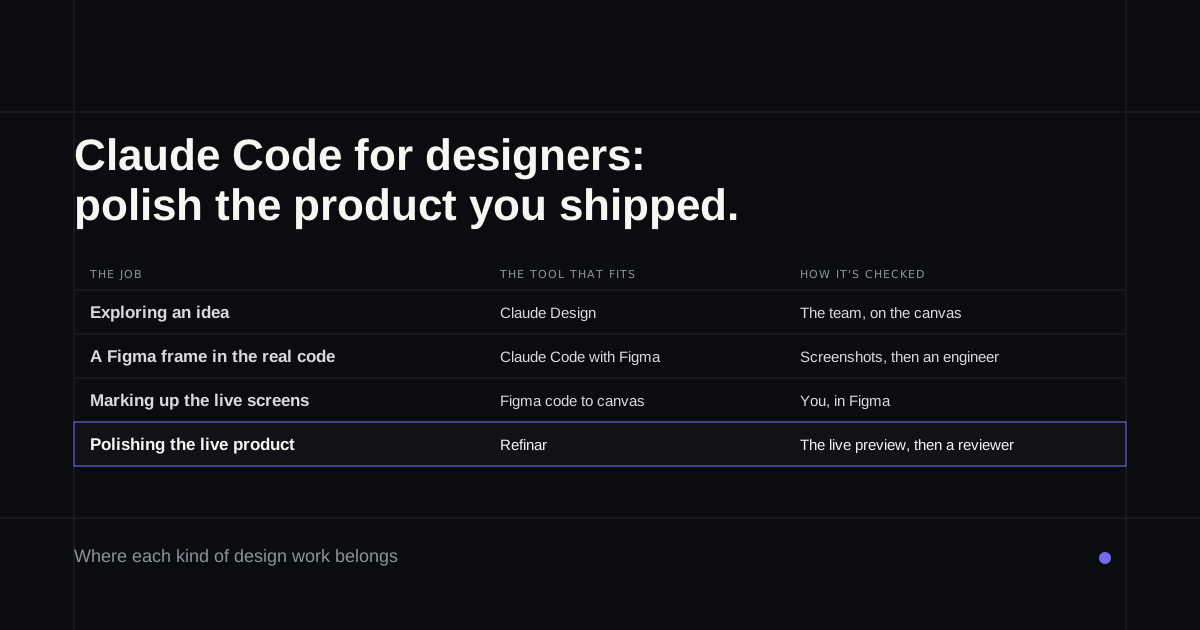
Most tutorials on Claude Code for designers build something new: a portfolio, a first app, a Figma frame turned into a component. That's a fine way to learn, but it misses what the people with the most practice actually do with it. Anthropic's own product designers used Claude Code mainly to polish the product they'd already shipped, fixing the spacing, type and colour drift that never makes an engineer's list. This guide follows that job: the Figma setup that helps, how to check the result, and what you need from engineering before any of it works.
If you want to fix the live product without setting up the code at all, the last section covers that.
What Anthropic's designers use it for
The detail is in the report Anthropic published alongside its July 2025 article on how its teams use Claude Code (the PDF, pages 16 and 17). Instead of writing design docs and going back and forth with engineers over typefaces, colours and spacing, the designers made those changes themselves. They filed GitHub issues describing a fix and let Claude's GitHub integration propose the code, which is how they worked through a standing backlog of polish. The team also removed "research preview" wording from across the whole codebase in two half-hour calls with the legal team, a job that would otherwise have taken a week of messages.
The team reports visual changes going two to three times faster, which is Anthropic's own measure of its own staff. Its practical tips are more useful than the number: ask engineers to handle the first repository setup and permissions, and keep a memory file telling Claude you're a designer who wants small changes and plain explanations.
Claude Design or Claude Code?
Anthropic now has a design tool, and the person who built it is clear about the split. Nate Parrott, the product designer behind Claude Design, puts it this way: "if you're shipping production software, stick with Claude Code" (July 2026). Claude Design is for exploring and getting agreement on an idea. When a design is ready, it hands a bundle to Claude Code, which continues from the existing work rather than rebuilding it from a screenshot.
The two also meet inside Claude Code. /design drafts a canvas of editable artboards you can pick from and ask Claude to build, and /design-sync reads the tokens and components of a design system that already exists in React (Anthropic's guide). There's no export from Claude Design to Figma, though, which matters if Figma is where your team agrees on things. The wider field of design tools is in Claude Design alternatives.
Connecting Figma
Figma's own setup guide recommends installing its Claude Code plugin with one command, claude plugin install figma@claude-plugins-official, then allowing access in the browser. After that you paste a link to a frame into your request. The connection hands Claude code for the frame (React and Tailwind unless you ask for your own components), the variables and styles it uses, and a screenshot to compare against.
Three details decide whether it helps or gets in the way:
- Your seat. View and Collab seats, and anyone on Figma's free Starter plan, get 20 tool calls a month. A Dev or Full seat on Professional gets 200 a day (Figma's limits).
- Your components. Figma says plainly that its server doesn't write final code or know your design system unless you supply it. Code Connect, which maps Figma components to the real ones in your repository, needs an Organization or Enterprise plan.
- Scope. Figma's design-to-code skill tells the agent to note problems outside the screen you asked about and leave them alone. Good for review, surprising if you expected a wider tidy-up.
Checking the result
The desktop app will run your app beside the conversation and, unless you turn it off, check each edit itself with screenshots and clicks (desktop docs). Anthropic's best-practice pattern for visual work is the same loop made explicit: paste a screenshot of the target, have Claude build it, screenshot the result, list the differences and fix them.
Figma also works the other way round. Its code-to-canvas tool captures a running interface as editable Figma frames, so you can mark up what's wrong on the real screen and send the fix back to code (Figma's guide). For polish work on a shipped product, that's the most useful thing in the whole setup.
What you need from engineering on day one
Everything above assumes the app runs on your machine. That means the repository cloned, its dependencies installed and the keys it reads at start-up, which usually sit in a .env file an engineer has to give you. Don't paste those keys into a chat. The Figma plugin is also a local setup: plugins installed in the desktop app don't reach Claude Code's cloud sessions.
Then there's review. A designer's pull request touches the same code as everyone else's, so someone who reads code approves it before it merges. Anthropic's own advice is to always give Claude a way to check its work and not ship what you can't verify, which for a designer usually means the screenshot comparison plus an engineer's eye on the diff.
Fixing the live product without the setup
If the polish backlog is the job and the local setup is the obstacle, Refinar takes a different route. Your app runs straight from GitHub in a preview on Refinar's cloud machines, so nothing is installed on your machine and no keys pass through your hands. You select the element that's off and adjust its text colour, background, font size, weight or alignment directly, or describe a bigger change, such as an empty state that needs designing properly, and watch an AI agent make it.
Every change can be rewound until it's published. When it's right, it can go live from there or go to a reviewer first, and an owner can make approval compulsory for the app. Restyling a sign-in or checkout screen is allowed; changing how sign-in or payments work stops and goes to a developer (how it works).
If the product you shipped has a list of small visual fixes nobody has time for, open it in Refinar and work through the first few.