Your company pays for Claude, and two colleagues have given you two different tips. The operations lead swears by Cowork for the weekly report. An engineer says anything real belongs in Claude Code. It's the same subscription, the same app and the same usage allowance, so Claude Cowork vs Claude Code is less a buying decision than a question of which job you're handing over. Anthropic's own answer fits in a line: Claude Code is for writing and shipping code, and Cowork is for knowledge work that isn't code. What most comparisons miss is how much Cowork changed in September and October 2026, and the one job neither tool was built for.
That job is a change to your company's app, asked for by someone who doesn't code. If that's why you're here, jump to the end for a tool designed around it.
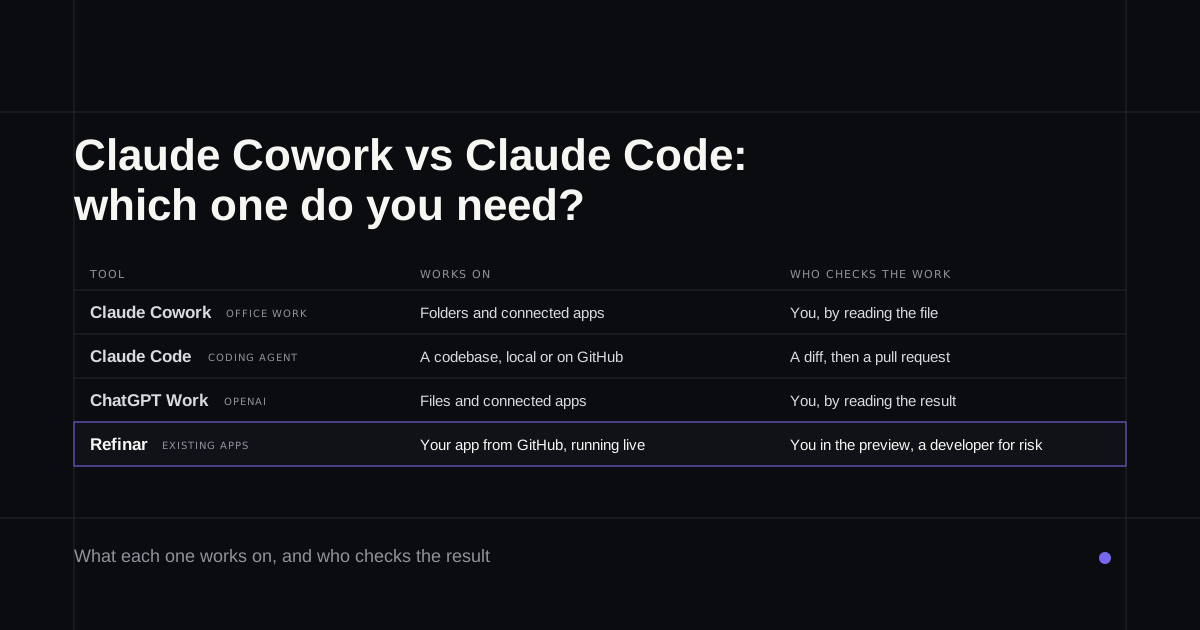
Claude Cowork vs Claude Code, side by side
| Claude Cowork | Claude Code | |
|---|---|---|
| Built for | Knowledge work that isn't code | Writing, debugging and shipping code |
| Works on | Folders you connect, plus apps like Drive or Slack | A codebase, on your computer or in GitHub |
| What you get back | Documents, spreadsheets, decks, reports | Changed files, a diff, a branch or a pull request |
| Who checks the work | You, by reading the result | A diff, then a pull request someone reviews |
| Where it runs | Anthropic's cloud by default | Your computer, or a cloud session |
| Terminal | Never | Not in the desktop app or browser; yes for the CLI |
| Price | Any paid Claude plan | The same plans, from the same usage pool |
Details from Anthropic's product pages and help centre, read on 5 October 2026.
Claude Cowork
Best for: handing off a piece of office work and coming back to a finished file.
Cowork "uses the same agentic architecture that powers Claude Code, with no terminal required", in the words of Anthropic's getting-started guide. You describe an outcome, connect the folders it may touch, and leave it to work. It reads and writes the formats an office runs on, from Word and PDF to Excel with working formulas, and it reaches other apps through connectors, a built-in browser or, as a last resort, by clicking around your screen.
Anthropic's examples give a feel for it: a folder of receipts turned into an expense report, or a quarter of sales-call notes sorted by objection. The company says the vast majority of Cowork use comes from outside engineering, and that tracks. It began on 12 January 2026 as a research preview and has been on every paid plan since April.
Cowork is now just Claude
Two changes this autumn put most older comparisons out of date.
On 16 September Anthropic announced that Cowork and chat are merging into one Claude. There's no mode to pick any more, because Claude decides whether a message needs an answer or a task. It's rolling out to Pro and Max over several weeks, Team and Free are due to follow, and Team and Enterprise organisations keep separate Chat and Cowork for now. The message box tells you where you stand: if it still shows "Chat" and "Cowork", the change hasn't reached you yet. The Code tab didn't move, so Claude Code is untouched.
Then, from 6 October, new Cowork tasks on Pro and Max run only in the cloud, and the "Only on your computer" setting goes away. Your folders stay on your machine. When a task needs a file, Claude fetches a copy of that one file through the desktop app, which has to be open. Anthropic's help article is plain about the alternative: if you want work to stay on your computer, use Claude Code in the desktop app. Each local task even gets a button to download its transcript so you can carry on there.
Claude Code
Best for: anyone who works in a codebase, or is ready to learn how.
Claude Code works inside a codebase, reading the project, changing files and running its commands. You can use it in a terminal, in VS Code, Cursor or JetBrains, in the Code tab of the Claude desktop app, or in a browser. The desktop app needs no terminal at all. Claude can start your app's development server, open it in a browser pane to check its own work, show you a file-by-file diff, then open a pull request and watch its checks (desktop docs).
Cloud sessions, which Anthropic called Claude Code on the web until they became generally available on 23 September, start from a GitHub repository. Claude clones it onto a machine Anthropic runs, makes the change and pushes a branch for you to review (how that loop works).
What Claude Code asks of you is judgement about code. It returns a diff and trusts that someone can tell whether it's right, which is a fair bet in an engineering team and a poor one in a marketing team.
Can Cowork change your app?
Partly, and not in a way you'd want for a live product. Cowork opens code files happily; Anthropic lists "pretty much any programming language" among the formats it handles. The product just isn't built around repositories. In the merged Claude, "Add from GitHub isn't supported", and Anthropic's own routing rule sends bug fixes, test runs and pull requests to Claude Code. Nothing in Cowork's documentation describes previewing a running app either.
So Cowork can edit a file in a folder, but there's no step where anyone sees the change working, or reviews it, before customers do. For a one-off script that's fine. For the checkout page, it isn't.
What they cost
You don't choose between them at checkout. Both come with every paid Claude plan: Pro is $20 a month or $17 billed yearly, Max is $100 or $200 depending on how much usage you need, and neither is on the Free plan (Claude pricing). A Team standard seat, $20 a month billed yearly or $25 monthly, includes both.
They also share one allowance. Anthropic's pricing FAQ says activity across the Claude apps and Claude Code "all draws from the same pool", and Cowork's own page warns that it uses those limits faster than chat. A heavy week of delegated reports leaves less room for code, and the other way round.
Codex vs Claude Cowork
Plenty of people search for Codex vs Claude Cowork, which compares the wrong pair. OpenAI's counterpart to Cowork is ChatGPT Work. In the ChatGPT desktop app you choose ChatGPT or Codex, and inside ChatGPT a toggle switches between Chat and Work. OpenAI describes Work as defining an outcome and getting back a reviewable result, such as a deck or an analysed file, while Codex debugs code, runs tests and reviews pull requests (OpenAI's overview). Work and Codex share usage, the same arrangement as Cowork and Claude Code, and Plus costs $20 a month.
Weighing a coding agent against an app builder instead? That's Lovable vs Claude Code vs Codex.
Which one, by job
- A deck, a spreadsheet or a research summary: Cowork, which on Pro and Max is now simply Claude.
- Work that has to stay on your computer: Claude Code in the desktop app, which is what Anthropic now recommends.
- A bug fix, tests or a pull request in a repository someone maintains: Claude Code.
- Your team lives in ChatGPT: Work for documents, Codex for code.
- A change to your company's app, asked for by someone who doesn't code: read on.
If the job is a change to your app
Here both tools leave a gap. Cowork isn't built for repositories or pull requests, and Claude Code hands back a diff that assumes a developer is reading it.
Refinar is built for that request. It opens your app from its GitHub repository and runs it in a cloud preview, so what you look at is your actual product instead of a description of a change to it. You type what you want, or click the heading or button you mean, and an AI agent makes the change while you watch. Any change can be reversed until it's published. When a request reaches sign-in, payments or customer data, Refinar builds the safe part and holds the rest. That goes to your developer as a draft pull request with notes on what's left, and if there's no developer, Refinar's own team picks it up within four hours on business days (how it works). Plans begin at $50 a month (pricing).
If there's a list of small changes to your app that nobody gets round to, connect it to Refinar and start with the first one.