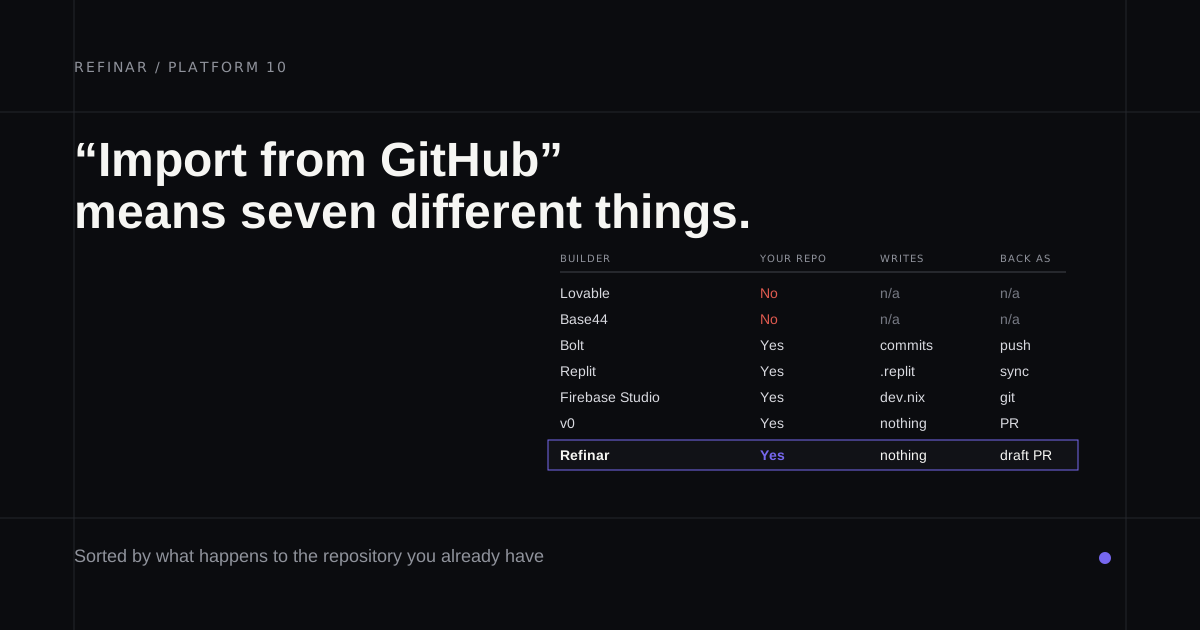
Your app already exists. Maybe it started in Lovable, or a contractor built it and left the repository in your GitHub account. People log into it now, and you'd like to change it by describing what you want instead of waiting for someone to be free.
Nearly every list of the best AI app builders scores how fast a blank prompt becomes a demo. That's the easy part. This comparison asks each AI web app builder something harder. Can it open code that already exists, and once that code lives in GitHub, can the builder and a developer both keep editing it without one overwriting the other?
Not sure what your app is built with? The checker at the end of this post will tell you.
The table
| Builder | Opens an existing repo | How the code leaves | Editing after it leaves |
|---|---|---|---|
| Refinar | Yes, GitHub only | Draft pull requests | The repository stays yours |
| Lovable | No, it creates a new one | Git sync, or a download | Two-way, one branch |
| Bolt | Yes, from a list or URL | GitHub sync or a zip | Two-way, Bolt wins ties |
| Base44 | Yes, through Base Code | GitHub sync from Builder | Two-way, on main |
| Replit | Yes, plus builder exports | Git push | Yes, through Git |
| v0 | Yes, monorepos too | Pull requests | Yes, with a Vercel project |
| Google AI Studio | Yes | GitHub sync or a zip | Two-way |
Refinar
Best for: an existing app on GitHub that people who don't code need to change, with a developer still reviewing.
Refinar is the odd one out on this list, because most of its work happens after the first version. It begins with the repository you already have, which it starts up on a cloud sandbox to give you a live preview. Whoever wants the change types it in plain words, or clicks the thing on screen they want different, and watches the agent work. What comes out is a draft pull request for a developer to approve. Nothing near sign-in, payments or customer data goes live by itself. Refinar builds the part that's safe and writes a brief for the rest, addressed to your developer or, when there isn't one, to a Refinar developer who picks it up within 4 hours on business days. Pricing begins at $25 a month (pricing). With no app yet, Refinar's builder starts one from a description, and it's changed the same way afterwards.
Lovable
Best for: starting from nothing, then handing the code to a developer.
Lovable's docs are blunt about existing code. Git sync is export only, so connecting a project always makes a fresh repository. After that it behaves well. A developer pushes to the synced branch and Lovable picks the commits up, and if the branch is protected, Lovable pushes to a separate lovable-sync branch rather than forcing its way in. Pro currently starts at $25 a month. For the workarounds, see Lovable vs Cursor.
Bolt
Best for: a JavaScript app you're happy to let a builder commit to directly.
Bolt imports a repository from a list or a pasted URL, and it's the keenest syncer here. Every change that doesn't break the project becomes a commit, and Bolt checks GitHub every 30 seconds for outside work. Read the warning under that feature before a developer joins in. When both sides change at almost the same moment, Bolt keeps its version and overwrites GitHub's (changing a Bolt app from GitHub covers the rest of the handover). Backends have to be JavaScript. Pro was $25 a month when this was written, and the free tier allows 300K tokens a day.
Base44
Best for: teams already on Base44 who now want to work in real repositories.
Apps built inside Base44 sync both ways with a new GitHub repository from the Builder plan ($50 a month), on a branch that has to be called main, and the synced code still talks to Base44's backend through @base44/sdk. Base Code, added in August 2026, runs the other way. Its AI chat works on branches of an existing web or full-stack repository and opens pull requests, while shipping stays with your own deploy process. Leaving is covered in Base44 alternatives.
Replit
Best for: moving an app into one workspace that also hosts it.
Replit treats rival builders as a source, on the free Starter plan or Core at $20 a month. Its import page names Lovable, Bolt and Base44 exports next to plain GitHub and Bitbucket repositories. Expect some re-entry, since a Lovable export arrives without its Supabase records or its secrets. After that, the Git tool pushes changes back to GitHub, and a longer walkthrough covers the rest.
v0
Best for: a Next.js app that already deploys on Vercel.
v0 imports a GitHub repository you can write to without duplicating it. The code is checked out in a Vercel Sandbox at the base branch you choose, and the first change gets its own working branch with a preview deployment. Publishing goes through a pull request that GitHub's branch protection still governs, which is how a developer would want it. The cost is a Vercel project, created during import if you lack one, and Plus costs $30 per user per month (more on v0).
Google AI Studio
Best for: an app built around Gemini that you'd deploy on Google Cloud.
Build mode in AI Studio quietly covers most of this post. You can import from GitHub, or link an app to a repository you already have and sync in both directions, with a side-by-side dialog for conflicts. Apps run in a Cloud Run container. If you used Firebase Studio, Google stopped new workspaces there on 22 June 2026 and shuts it down on 22 March 2027.
Which one
- A live app on GitHub, changed by someone who doesn't code: Refinar, once you connect the repository.
- A blank page: Lovable, synced to GitHub on day one.
- A Node or React app that can live in a browser builder: Bolt.
- Already on Base44: try Base Code before moving.
- Code and hosting under one login: Replit.
- Next.js on Vercel: v0.
- A Gemini app headed for Cloud Run: Google AI Studio.
The developer tools for these same repositories are in the best vibe coding tools.
Tables only go so far, and your own repository is the real test. Point Refinar at it and ask for the small change you'd normally wait a week for.