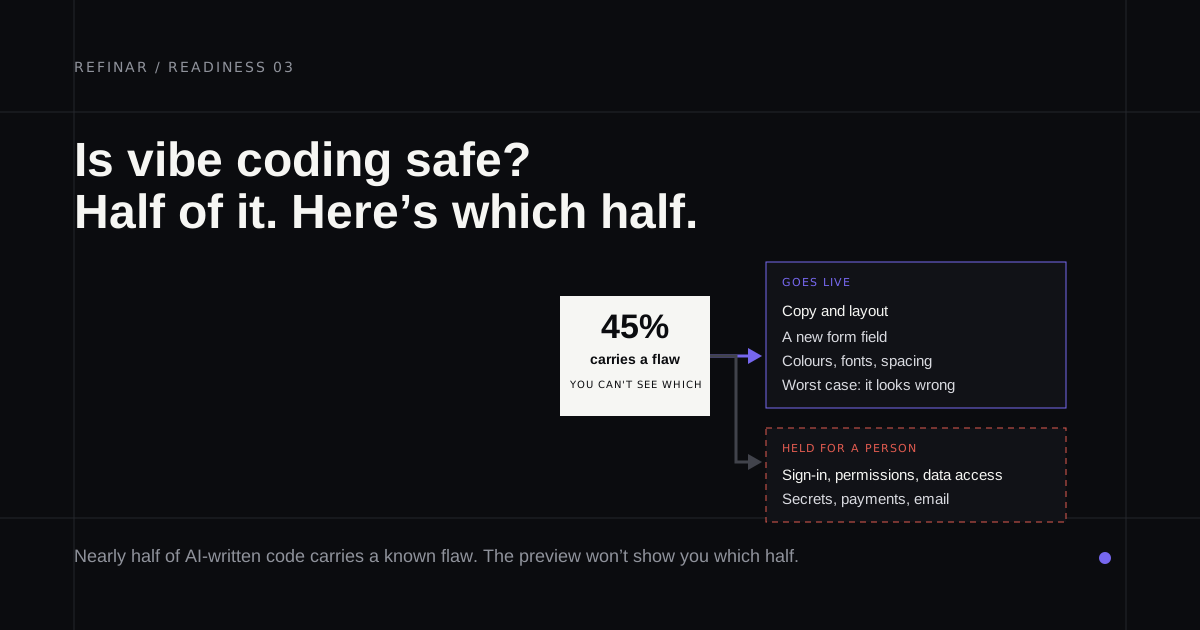
You built the app with Lovable, Bolt, Replit or Cursor. People sign in and some of them pay. Now you've read about another vibe-coded app leaking its database, and since you can't read the code, you can't tell whether yours is next. Below is the evidence, then a way to check your own app this afternoon.
If you plan to keep building, the closing section draws a line between safe and risky changes and explains how Refinar keeps the risky ones away from your live app until a developer has seen them.
Is vibe coding safe?
It's safe for the parts of an app you can see and unsafe by default for the parts you can't. Andrej Karpathy named it in February 2025 (building by prompt and accepting what comes back without reading it closely), and Collins made it Word of the Year 2025. The trouble is that security lives almost entirely in the code nobody reads. A layout bug shows up in the preview. A database that answers strangers doesn't.
What the research says about AI code security
Veracode has tested more than 100 models on the same set of security tasks. Its 2025 report found 45% of code samples failed its security tests. The 2026 update, published on 28 July 2026, puts the average pass rate at 56%, barely moved from 55% in the first report, even though models now write syntactically correct code almost every time. Defences against cross-site scripting (one visitor's input running in another visitor's browser) passed just 15% of the time. Large models averaged 53% and small ones 51%, so waiting for a better model isn't a plan.
The finding that matters most for founders comes from Stanford. In a controlled study (Perry et al., CCS '23), people with an AI assistant wrote significantly less secure code than people without one, and they were more likely to believe their code was secure. Confidence went up as safety went down.
Leaked keys are the other half. GitGuardian's 2026 report counted 28.65 million new hardcoded secrets in public GitHub commits during 2025. Commits made with Claude Code leaked a secret 3.2% of the time against a 1.5% baseline, though GitGuardian stresses that a person still accepted and pushed each one. Leaked keys also stay useful for years. Of credentials confirmed valid in 2022, more than 64% still worked when retested in January 2026.
Three incidents that show the pattern
Lovable, 2025. The researcher Matt Palmer scanned 1,645 Lovable projects and found 170 whose databases anyone could query with the public key already sitting in the page. Exposed data included usernames, emails, phone numbers, subscription details and developers' own API keys. It became CVE-2025-48757. Lovable disputes the CVE on the grounds that each customer is responsible for protecting their own app's data, which at least makes clear whose job it is.
Moltbook, January 2026. Its founder said publicly that he hadn't written a line of the code. Wiz found the Supabase key in the site's JavaScript (normal, since that key is designed to be public) with no Row Level Security behind it (fatal). Their write-up counts 1.5 million API keys and 35,000 email addresses open to anyone. Moltbook's team secured it within hours of the report, according to Wiz.
Base44, July 2025. This one was a bug in the platform itself. Wiz showed that a non-secret app ID was enough to register a verified account on someone else's private app. Wix, which owns Base44, fixed it within 24 hours and reported no sign of past abuse.
Where the risk lives
A September 2025 Wiz review of vibe-coded apps found the same four misconfigurations recurring:
- Tables without Row Level Security. Your app talks to the database straight from the browser, so the database rules are the only lock on the door.
- Secrets in client-side code. A payment or admin key that ships in the JavaScript can be read by anyone who opens developer tools.
- Sign-in checked only in the browser. Hiding the admin button doesn't stop someone calling the admin action directly.
- Internal tools left public. A back-office page with no sign-in at all.
None of these break anything you'd notice. The app loads and the demo works. A preview shows you what the app does for you, and it has nothing to say about what it does for a stranger.
How to check your own app
Most of this needs no code reading:
- Scan what's public. The free broken-app check loads your published site the way a visitor would, looks for keys in the JavaScript and tries to fetch
/.env. - Identify any key it finds. Paste it into the Supabase key checker, which runs in your browser. A publishable key (or the legacy anon key) is meant to be public. A secret or
service_rolekey skips every database rule. Supabase's key docs point out that a secret key refuses to work from a browser but still works from any other tool, so an exposed one has to be replaced and then deleted in Settings > API Keys. - Open Supabase's Security Advisor. An error titled "Table publicly accessible" means that table can be read and changed by anyone who has your project URL.
- On Lovable, run the Deep scan. It lives under More > Security and costs nothing. It reads your code for access-control and payment problems that the automatic scan at publish time doesn't cover.
- Pretend to be someone else. Sign up with a second account, open a page that shows your first account's data and change the ID in the address bar. If the other account's records appear, stop and fix that first.
If a key came from an environment variable, this checker shows which variable names get written into the browser bundle. Then work through the full web app security checklist before inviting more users.
So, should you keep vibe coding?
Yes, with a line drawn. Copy and layout changes, even whole new screens, are fine to ship on your own judgement, because the worst case is visible. Anything touching sign-in, database rules, keys or payments needs someone who can read code to approve it, because that worst case stays invisible until a stranger finds it.
Refinar draws the same line. It starts an app you already have on GitHub inside a cloud sandbox, and you watch an AI agent make each change in the live preview. Anything reaching sign-in, payments or customer data skips automatic publishing (how it works). Refinar builds the harmless part, and your developer receives the remainder along with a written brief. Without a developer of your own, a Refinar developer takes the remainder, inside 4 hours on business days.
If your app is already on GitHub and you'd like that line drawn for you, start with one small change.