The email usually arrives first. Your project will be paused for inactivity, or it has gone over a quota, or the invoice is higher than last month and you're not sure why. If a builder like Lovable or Bolt, or a freelancer, set up your app, Supabase is probably the database underneath it, and Supabase pricing is now your problem. This guide explains the free tier limits, what pausing and read-only mode actually do, what the Pro plan costs once you add it up, and how Neon compares, using Supabase's own pricing page and docs as of 10 October 2026.
If what you really want is to change the app without waiting on whoever built it, the last section is about that.
First, check whose Supabase it is
Not every app that "uses Supabase" has a Supabase account you can see.
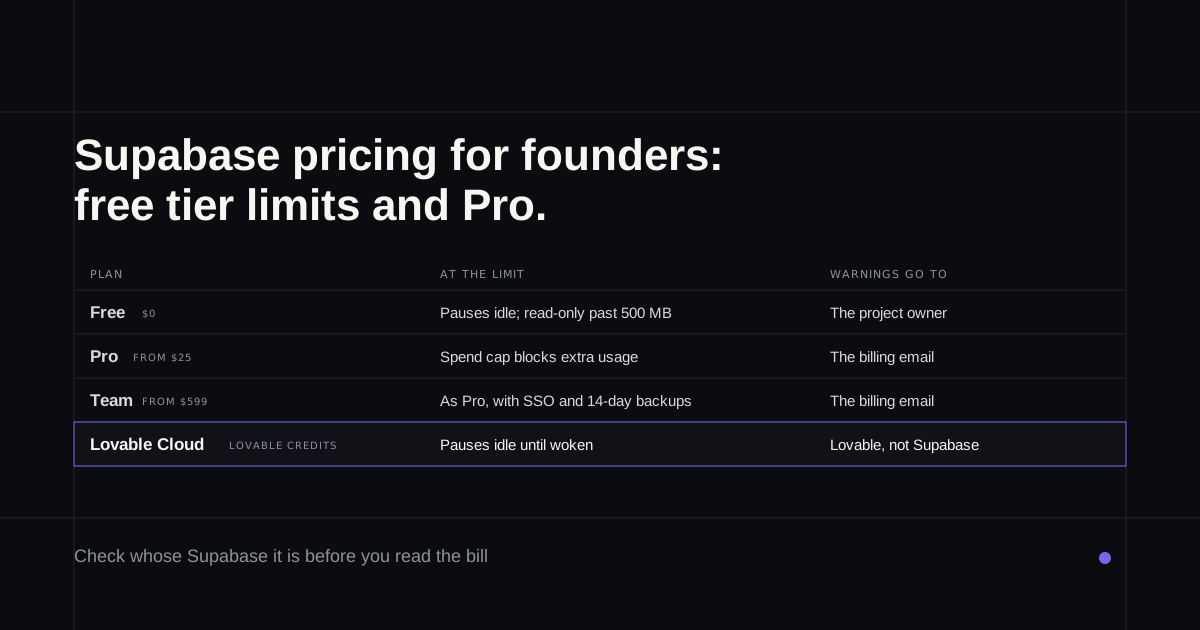
Lovable Cloud runs on Supabase but belongs to Lovable. It doesn't appear in your Supabase dashboard, it's paid for in Lovable credits, and moving it to your own Supabase account is a manual job (Supabase's note on it). Lovable also pauses idle Cloud projects, and they stay paused until someone clicks Wake up in the editor. None of the Supabase prices below apply; Lovable pricing does.
Bolt uses its own Bolt Database by default. Connecting Supabase needs a Bolt Pro or Teams plan, and Bolt warns that connecting it to a project that already has a Bolt Database "may cause data loss" (Bolt's guide).
A freelancer's account is the quiet risk. Supabase sends quota notices to the organisation's billing email and pause warnings to the project's owner. If the freelancer owns the organisation, those emails go to them and you find out when the app stops.
Supabase pricing at a glance
| Plan | Price | Best for |
|---|---|---|
| Free | $0 | Trying ideas; two active projects |
| Pro | From $25 a month | An app real people use |
| Team | From $599 a month | Companies needing SSO, compliance reports and longer backups |
| Enterprise | Custom | Contracts, dedicated support |
Billing is per organisation, not per project (pricing). That detail matters for Pro, as the cost example below shows.
The free tier limits that matter
Each free project gets a 500 MB database, and a new project already uses roughly 40 to 60 MB of it. The other monthly allowances are 5 GB of data transfer, 1 GB of file storage, 50,000 monthly active users and 500,000 edge function calls. There are no backups on the free plan.
You can have two active free projects, counted across every organisation where you're an owner or admin. Paused projects don't count towards the two.
Pausing, read-only mode and restrictions
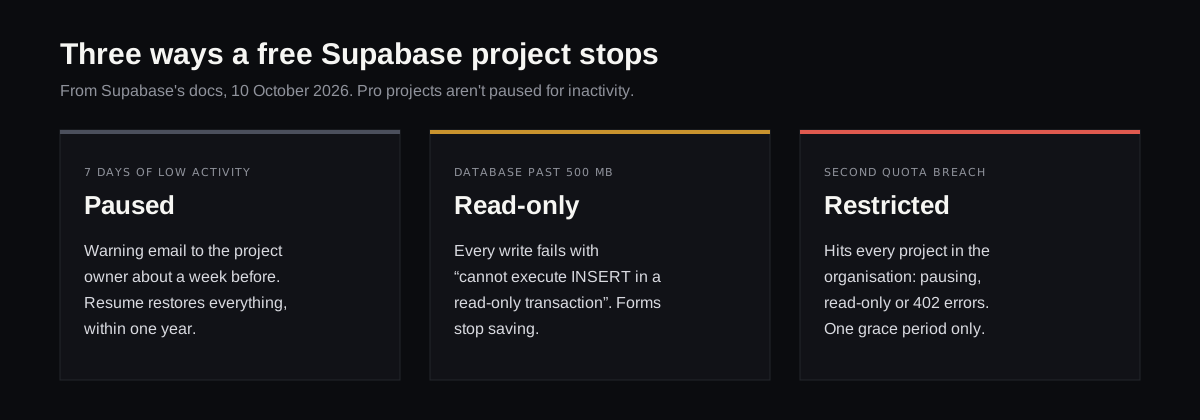
A free project pauses after seven days of low activity. The owner gets a warning email about a week before and a confirmation when it happens. Clicking Resume project brings back the data and settings, and you now have a year to do it; the docs said 90 days until July 2026, and plenty of guides still do (pausing docs).
Past 500 MB, a free database goes read-only, and every write fails with an error saying it "cannot execute INSERT in a read-only transaction". To your customers, that looks like a form that silently stops saving.
Going over the other quotas brings Supabase's fair use rules into play, and they reach further than most people expect. A restriction applies to every project in the organisation and can mean pausing, read-only mode or requests failing with a 402 error. You get one grace period; go over again and the restriction is immediate. The database-size check uses your average daily size across the month, so deleting data today doesn't lift it straight away (cost control).
What the Pro plan actually costs
Pro is $25 a month and includes $10 of compute credit, which covers one project on the smallest Micro size. Each extra project adds its own compute, from $10 a month, so Supabase's own examples come to $35 for two projects and $45 for three (compute docs).
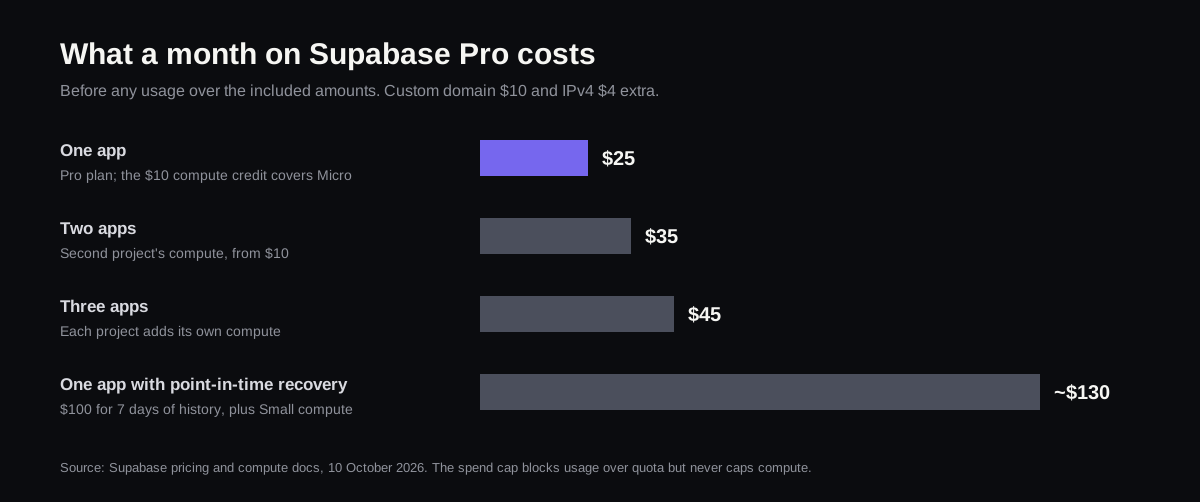
The spend cap is on by default. When you reach a quota, Supabase blocks the extra usage instead of billing for it. It doesn't cover everything, though: compute, a custom domain at $10 a month, a dedicated IPv4 address at $4, point-in-time recovery, branching and log drains all bill regardless, and the cap has no budgets or alerts.
Past the included amounts, the main overage prices are $0.09 per GB of data transfer after 250 GB, $0.00325 per monthly user after 100,000, $0.125 per GB of database disk after 8 GB, and $2 per million edge function calls after two million. Pro keeps daily backups for seven days. Point-in-time recovery, which lets you roll back to a moment rather than a day, costs $100 a month per seven days of history and needs at least the Small compute size, which is why the last bar in the chart jumps.
When Pro is worth it
- Customers use the app every day. Pausing is no longer a risk you can take, and pausing for inactivity is a free-plan rule.
- You'd lose sleep without backups. Free has none; Pro has seven days of daily ones.
- The database is past about 400 MB. Read-only mode arrives at 500, with no warning to your users.
- A second app is on the way. Budget $10 a month for each one, not just the $25.
If none of those apply yet, the free tier is fine, as long as the warning emails reach you.
Neon vs Supabase
Neon started as serverless Postgres and is now "from Databricks", which announced the acquisition in May 2025 (Databricks' release). Its free plan gives 1 GB per project, and idle databases switch off after five minutes and wake on the next request, so there's no pausing to manage. Paid plans have no monthly minimum, and Neon puts typical spend on its Launch plan at around $15 a month.
The bigger difference is what comes with the database. Supabase bundles sign-in, file storage, edge functions and realtime, and an app built by Lovable or Bolt usually leans on several of them. Neon now sells auth, functions and storage too, but moving an app between the two means rewiring those pieces, not just copying data. For an app that already works on Supabase, the cheaper move is usually to understand the Supabase bill (Neon vs Supabase goes through the rest, including what a move would break).
How to check your own usage
Open the organisation's Usage page in the Supabase dashboard to see each quota against its limit, and the billing page's Upcoming Invoice for the running estimate. Then check one setting: the organisation's billing email. If it's a freelancer's address, change it to yours before the next notice goes out.
Changing the app on top of it
Understanding the bill often leads straight to wanting changes, a slimmer upload, a cleanup job, a page that queries less, and the person who built the app isn't always around.
Refinar works on apps like these when the code is on GitHub. It opens the repository, runs the app in a cloud preview connected to the same Supabase project, and lets you ask for a change in plain words, or point at the screen it belongs to, while an AI agent makes it. Because the preview uses your real backend, its data is your customers' data. Anything that deletes data, or touches sign-in or payments, stops and goes to a developer before it ships (how it works).
If your app sits on your own Supabase and its code is in GitHub, try Refinar on it and start with the change the invoice made obvious.