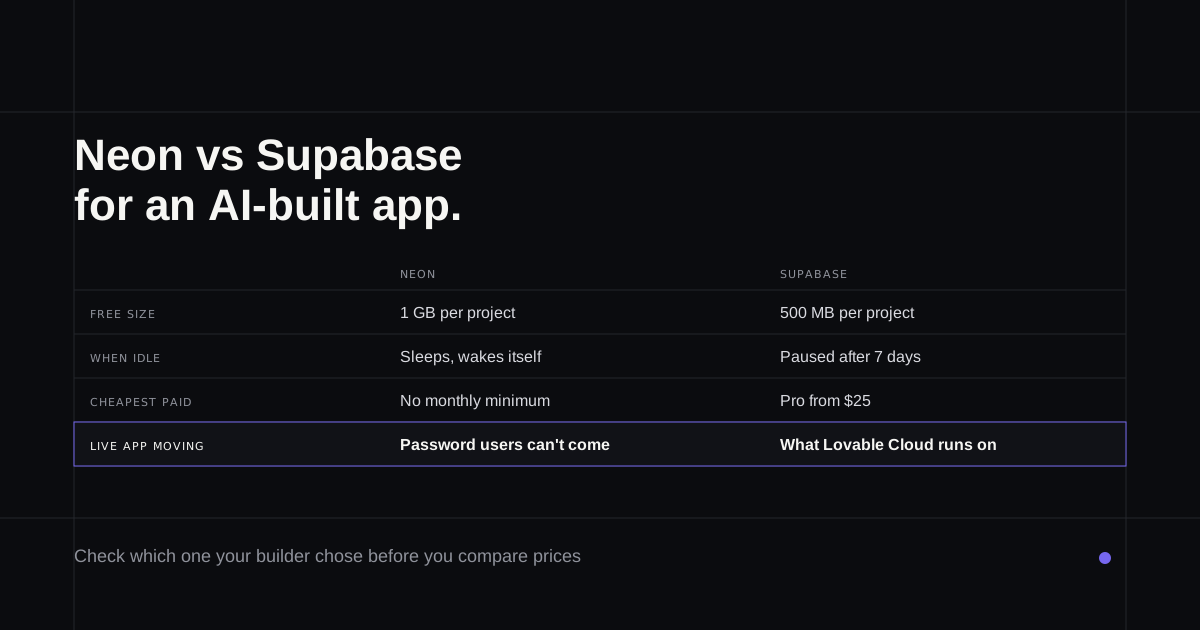
Most Neon vs Supabase comparisons are written for developers choosing a database for a new project. If an AI builder made your app, the choice was probably made for you, and the real questions are different: which one am I already on, what will it cost as people start using the app, and would moving to the other one break anything? This guide answers those, using both vendors' own pricing pages and docs as of 12 October 2026. Several facts changed in the last month, so older comparisons are out of date.
If the app itself needs changes and nobody on the team codes, the final section is about that.
First, find out which one you're on
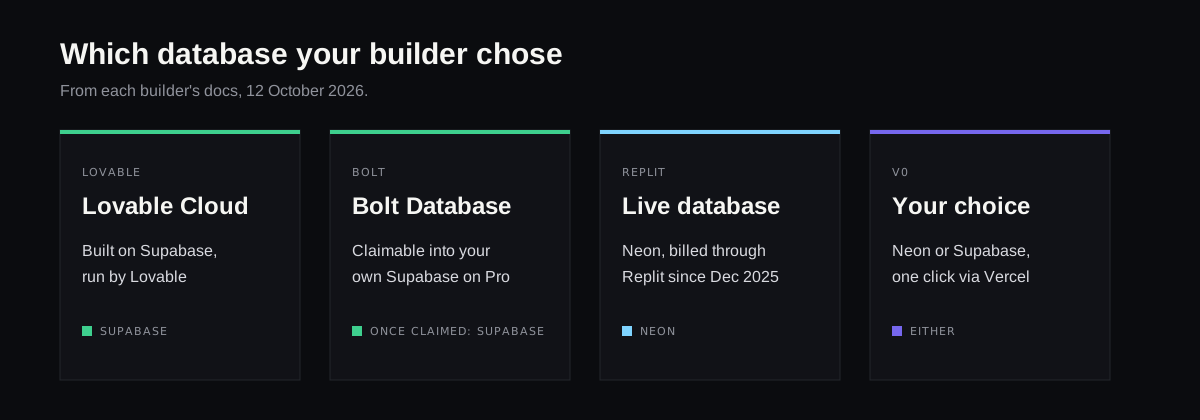
The builder usually decided.
- Lovable: Lovable Cloud, on by default, is built on Supabase but run by Lovable, so it won't appear in your own Supabase dashboard (Lovable Cloud). A Neon connector arrived on 8 October 2026, but it lets the app read and write an existing Neon database through one shared login. It doesn't swap the backend.
- Bolt: Bolt Database by default. On Pro or Teams you can claim it into your own Supabase account, and there's no way back (Bolt on Supabase).
- Replit: split in two since 4 December 2025. The database you build against runs on Replit's own system, while the live app's database is still "billed based on usage through Neon" (Replit's docs).
- v0: either one. v0 connects Neon or Supabase in a click through the Vercel Marketplace (v0 databases). Vercel's own Postgres moved to Neon in December 2024, which is why many guides treat v0 as a Neon product.
Neon vs Supabase at a glance
| Neon | Supabase | |
|---|---|---|
| Free database size | 1 GB per project, 100 projects | 500 MB per project, 2 active projects |
| When idle | Sleeps after 5 minutes, wakes on the next request | Paused after 7 days, until someone clicks Resume |
| Cheapest paid plan | Launch, pay as you go, no monthly minimum | Pro, from $25 a month |
| Spending limit | Notifications at 80% and 100% | Spend cap, on by default |
| Bundled with the database | Auth, file storage, functions, a REST API | Auth, file storage, functions, a REST API, realtime |
| Owned by | Databricks | Independent |
What each one is now
Supabase is a Postgres database that comes with sign-in, file storage, edge functions and live updates in every project. Apps from Lovable and Bolt lean on several of those pieces at once, which helps explain why both builders went with it.
Neon started as serverless Postgres that switches itself off when nobody's using it. Databricks announced it was buying Neon in May 2025, for about $1 billion according to Reuters, and Neon now describes itself as "from Databricks" (Databricks' release). On 18 September 2026 its wider backend became generally available: sign-in built on Better Auth, a REST Data API that behaves like Supabase's, Node.js functions and file storage (Neon's changelog). So the old line that Neon is only a database no longer holds. What it still lacks is realtime, which its own changelog lists as coming.
The free plans
Neon raised its free database size from 0.5 GB to 1 GB per project on 2 October 2026, and most comparisons still quote the old number. You get 100 projects, 100 compute hours per project each month and six hours of restore history. Running out of compute hours suspends the database until the next month; going over the storage limit blocks writes. Neon says none of its limits delete data (pricing).
Supabase gives 500 MB per project and two active projects. The bigger difference is what happens when the app goes quiet. A free Neon database sleeps after five minutes and wakes itself within a few hundred milliseconds, so the first visitor waits slightly longer. A free Supabase project is paused after a week of low activity and stays down until its owner clicks Resume, which can be done for up to a year (pausing). For a demo link you send to investors, that difference matters more than the storage numbers.
What the paid plans cost
Neon's Launch plan has no monthly minimum. Compute is $0.106 per hour of use and storage is $0.35 per GB each month, and Neon puts typical spend at $15 a month for a small database that doesn't run around the clock. A database kept awake all month at the smallest size comes to roughly $19 in compute at those rates, which is probably where the "$19 a month" in many older articles came from. Neon sends spending notifications but has no hard cap.
Supabase Pro is $25 a month with $10 of compute credit, enough for one small project; each extra project adds about $10. Its spend cap is on by default and blocks usage past your quotas instead of billing for it, though compute and add-ons such as point-in-time recovery bill regardless (Supabase pricing for founders goes through the whole invoice).
For one small app, Neon is usually cheaper and Supabase more predictable. With several small apps, Neon's lack of a per-project base price adds up in its favour.
What breaks if you move from Supabase to Neon
The table data copies across with a standard dump and restore, and Neon's guide even offers an adapter so most Supabase queries in the app keep working (Neon's migration guide). The rest is harder.
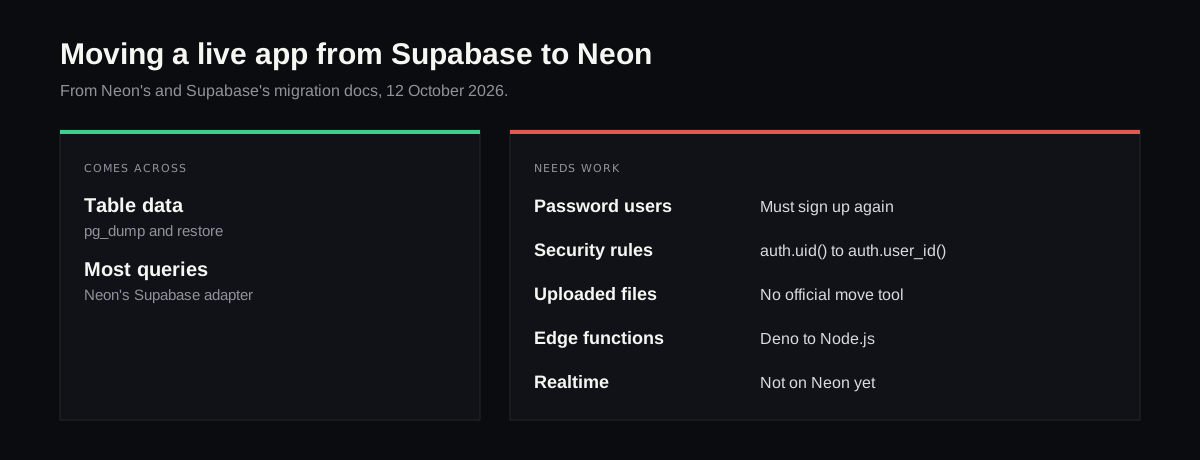
- Password users can't come with you. Neon's own guide says they "cannot migrate due to different hashing algorithms" and will need new accounts or a Google-style sign-in. It recommends the path for "new projects, early development, or rebuilding your app". For a live app with customers, this one fact usually settles the question.
- Security rules need rewriting. Supabase's row rules call
auth.uid(); Neon's equivalent isauth.user_id(), so every policy needs checking. - Uploaded files don't travel in the dump. Neon's file storage is a separate store, and there's no official tool to move Supabase Storage into it.
- Functions need porting. Supabase edge functions run on Deno, while Neon's run on Node.js in four regions.
- Realtime has no Neon equivalent yet. If your app has live chat, notifications or a dashboard that updates by itself, it stays on Supabase for now.
Going the other way, from Neon to Supabase, Supabase documents a dump and restore (its guide), but there's no official path for users who sign in with Neon's auth.
Which one, by situation
- Your app came from Lovable or Bolt and works: stay on Supabase, and learn the bill.
- Your app is a Replit app: your live database is already Neon, paid through Replit; moving it out is a dump using the connection string from its settings.
- You're starting a small app or several prototypes: Neon's free plan and pay-as-you-go pricing cost less.
- Your app uses live updates or a lot of file uploads: Supabase.
- Your app has paying users with passwords: don't move it to Neon without a plan for every one of them.
Changing the app on either one
The database question tends to settle itself once you know which builder made the app. The app on top of it keeps changing for years, though, often after the freelancer or the builder's credits have run out.
Refinar is built for that stretch. It opens the app's code from GitHub, starts it in the cloud against the backend it already uses, Neon or Supabase, and lets someone who doesn't code ask for a change in a chat or by clicking the part of the page that's wrong. Since that preview reads and writes real records, the agent pauses on anything that would delete data or alter sign-in or payments, and hands that work to a developer instead of publishing it (what it stops on).
If your app lives in a GitHub repository, connect it to Refinar and make the first change a small one.