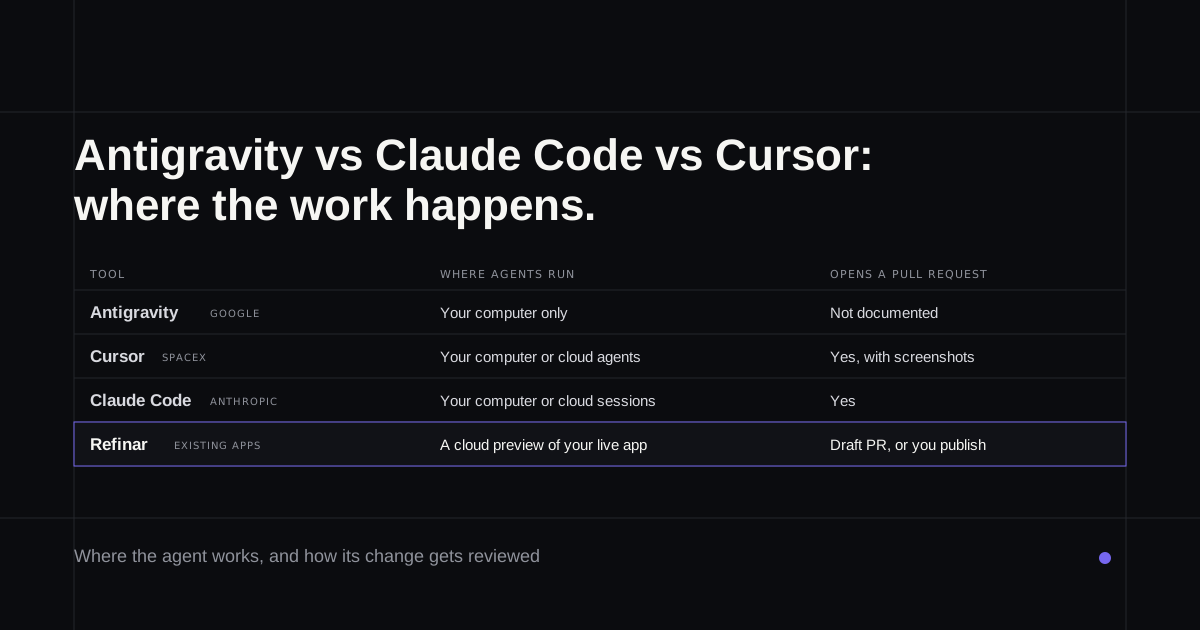
Most comparisons of Google Antigravity vs Claude Code, or Antigravity vs Cursor, describe three tools that no longer exist in that form. In May Google turned Antigravity into a separate agent app with no code editor. In August SpaceX bought Cursor. In September Claude Code's cloud sessions became generally available. The question that separates them now is less about which model is smartest and more about where the agent does its work, who checks the result, and what you pay once you use it every day. Everything here comes from each vendor's own pages, read on 10 October 2026.
If you don't write code and the app in question already has customers, the last section is the one for you.
Antigravity vs Claude Code vs Cursor at a glance
| Google Antigravity | Cursor | Claude Code | |
|---|---|---|---|
| What it is | An agent app, plus the original editor and a CLI | A code editor with an agent window | A coding agent in the terminal, editors, desktop and browser |
| Where agents run | Your computer only | Your computer, or cloud agents | Your computer, or cloud sessions |
| Opens a pull request | Not documented; commit and push yourself | Yes, from cloud agents | Yes |
| Free plan | Yes, with a weekly quota | Hobby, with a limited agent | No |
| Paid from | $20 a month (Google AI Pro) | $20 a month (Pro) | $20 a month, or $17 billed yearly |
| Models | Gemini, plus Claude on paid plans | Cursor's own models, plus others at API rates | Claude |
Google Antigravity
Best for: trying an AI agent for free on code that lives on your own computer.
Antigravity launched in November 2025 as an editor built around agents. On 19 May 2026 Google released Antigravity 2.0, a standalone desktop app with no code editor at all, where agent chats are grouped into projects and can run subagents or scheduled jobs. Google now suggests pairing it with whatever editor you already use, and says the agent panel will be removed from the original editor. It's out of preview and listed as generally available.
The free individual plan comes with what Google calls a meaningful quota, refreshed weekly. Google AI Pro, at $20 a month, refreshes every five hours until a weekly limit, and AI Ultra costs $100 for five times Pro or $200 for twenty times, down from $250 (plans). Gemini models are on every plan; Claude models need a paid Pro or Ultra plan, and some older model options disappear on 2 November.
Two things deserve attention before you point it at a real project. Antigravity only works on folders on your own machine; its Remote Control lets you steer it from a browser, but the computer has to stay awake, and Google-hosted cloud agents are still listed as a future launch. And on the free and individual plans, Google's terms say its employees and contractors may review your interactions unless you opt out in settings (terms). Security researchers at PromptArmor also showed in November 2025 that a poisoned web page could make the browser agent read and leak a .env file. Commands now run in a sandbox by default, though only on macOS and Linux.
Cursor
Best for: developers who want an editor and an agent in one place, and designers who'd rather click than describe.
Cursor announced on 14 August 2026 that it had been acquired by SpaceX. Its own models, built with SpaceX's AI team, now get a larger usage allowance than the third-party models, which are billed at API rates. The editor still exists, with an agent window added in April for running several agents, reviewing diffs and managing pull requests.
Cloud agents are Cursor's answer to the laptop problem. Each runs in its own cloud machine with the project set up, tests its change and opens a pull request with screenshots or a video attached, and you can take over its remote desktop to try the change without checking out the branch (cloud agent docs). They need a paid plan and an admin to connect GitHub or another source host first.
Design Mode is the friendliest feature in any of the three for someone who doesn't code: click an element in the running app, draw on the page or speak, and the agent edits the code behind it. Pricing runs from Hobby at $0 through Pro at $20, Pro+ at $60 and Ultra at $200, with Teams at $40 a user. Cursor's own docs say daily agent users typically spend $60 to $100 a month in total.
Claude Code
Best for: working inside an existing codebase, from a terminal, an editor or a desktop app.
Claude Code reads a project, edits files and runs commands, from a terminal, VS Code, JetBrains, Anthropic's desktop app or the web. The desktop version runs your project beside the chat, checks each edit itself, then moves from a diff to a pull request. Cloud sessions, generally available since 23 September, clone a GitHub repository onto Anthropic's machines and push a branch for review (how that works).
It isn't on Claude's free plan. Pro costs $20 a month or $17 billed yearly, and Max costs $100 or $200 (pricing). If the Claude names are confusing, Claude Cowork vs Claude Code sorts out which product does what.
Where the work runs
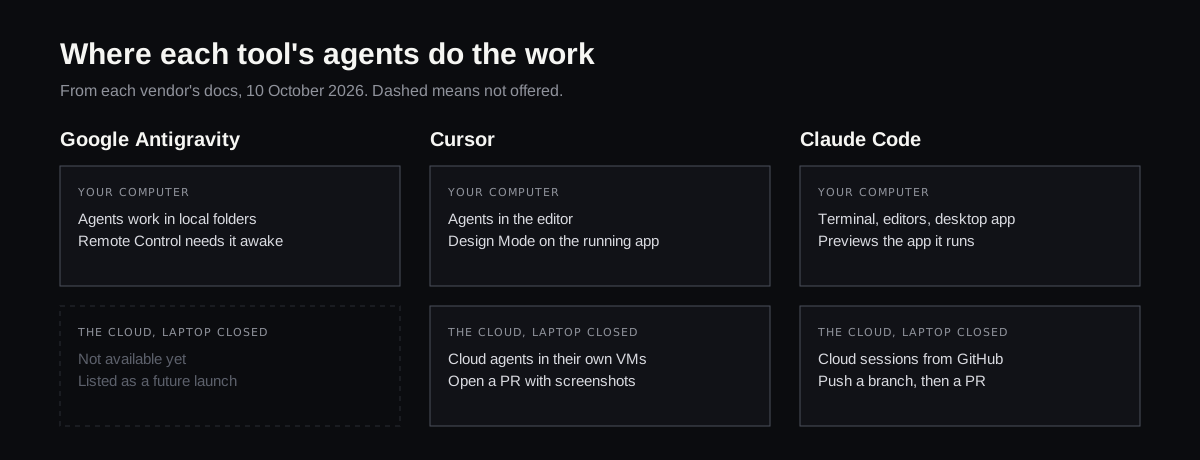
This is the difference most comparisons skip. With Antigravity, the agent stops when your laptop sleeps, and everything the project needs, keys included, sits on that laptop. Cursor and Claude Code can both hand a task to a cloud machine and let you close the lid, ending in a pull request someone reviews. For a team, that review step is what makes the work shippable.
What they cost
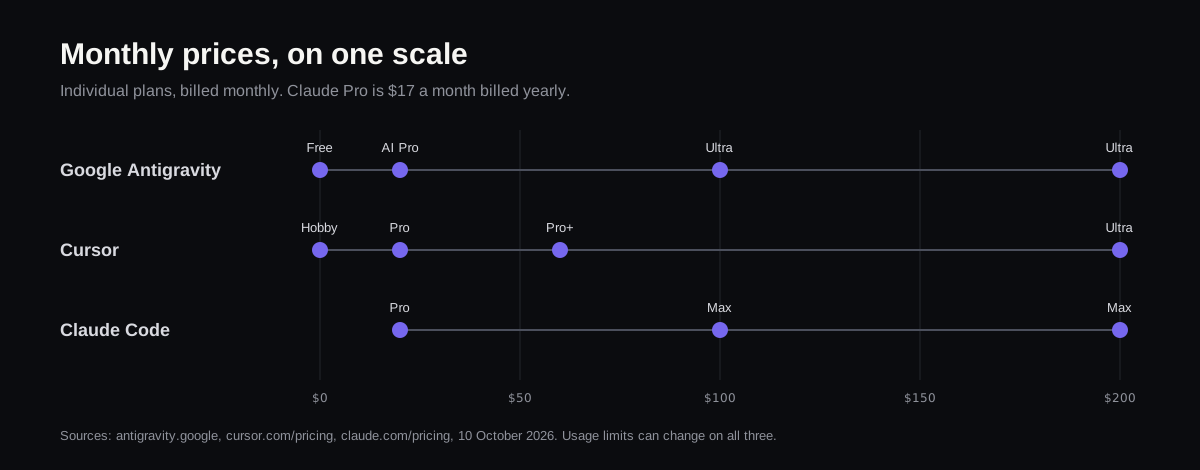
The entry prices line up at $20, and each has a $200 tier for heavy use. The free tiers differ more than the paid ones: Antigravity's is the most usable, Cursor's limits the agent, and Claude Code has none. Usage limits on all three can change without notice, so treat any per-day number in older articles with suspicion. For OpenAI's side of the same market, see Codex pricing.
Which one, by situation
- You want to try an agent without paying: Antigravity's free plan, on a copy of your code.
- You're a developer who lives in an editor: Cursor.
- You want tasks to run while your laptop is closed and end in a pull request: Cursor's cloud agents or Claude Code's cloud sessions.
- You're a designer fixing the running app by pointing at it: Cursor's Design Mode, on a machine a developer has set up.
- You care who can read your prompts: check the plan's data terms first, Antigravity's individual tier especially.
- You don't code and the app is already live: read on.
If you don't code and the app is live
All three assume somebody can run the project, read a diff and decide whether it's safe to merge. That somebody is the bottleneck when the person with the request is a founder or a product manager.
Refinar is built for that person. It pulls the app from GitHub and boots it in the cloud, which keeps installs and keys off your laptop. You say what should change or click the spot in the live preview, see the agent work through it, then put it live or hand it to a reviewer. Changes that touch who can sign in, what customers are charged, or that delete data stop and wait for a developer (how it works).
If your app is on GitHub and the agents above all expect a developer you don't have, try Refinar on it.