Maybe a developer asked for access to the code, or you just want a copy of your app somewhere Lovable doesn't control. Either way, connecting a Lovable project to GitHub takes a couple of minutes. Knowing what the connection actually does takes a bit longer, and it's the part that saves you from a confusing afternoon later.
If the goal is for someone who doesn't code to keep changing the app from GitHub, skip to what happens after the export, where Refinar comes in.
How the sync works
You connect from the project, through Lovable's GitHub app, to a personal account or an organisation. It's on every plan, Free included, for github.com. GitLab and Bitbucket work the same way. GitHub Enterprise Server, or Enterprise Cloud with data residency, needs Lovable's Enterprise plan.
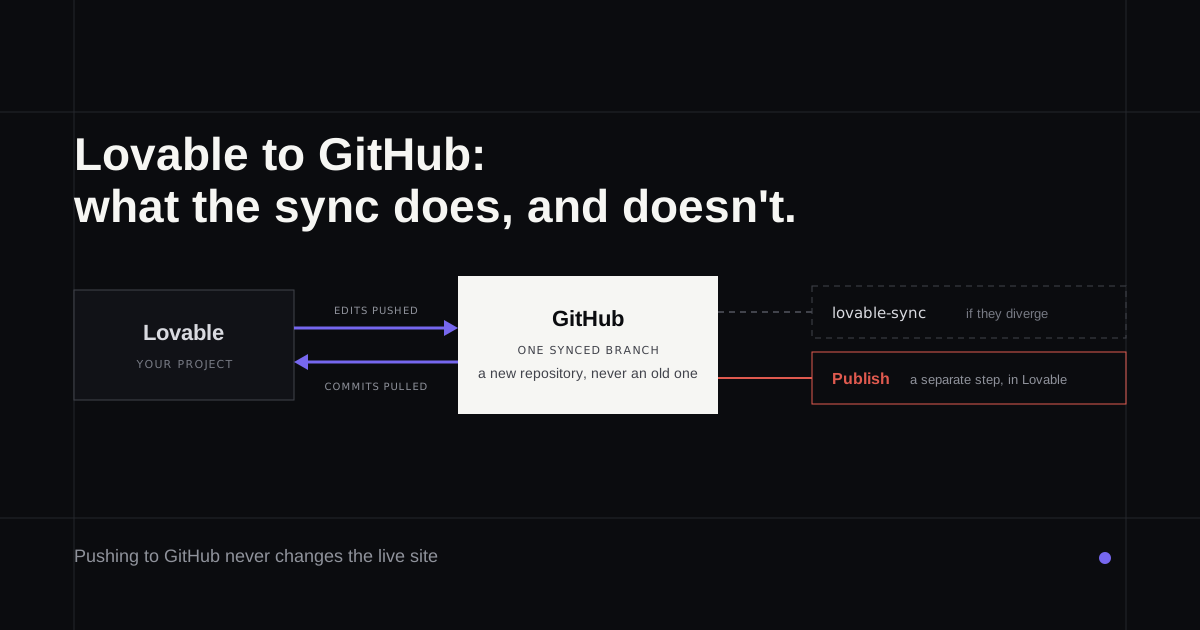
Lovable then creates a new repository for the project. That's the only direction it goes. Lovable's Git sync docs (as of 29 September 2026) say you can't point it at a repository you already have and import it. That limit gets its own write-up in can Lovable import an existing GitHub repo.
From then on the sync runs both ways, on one branch at a time. Edits you make in Lovable are committed and pushed to the repository. Commits someone pushes to the synced branch show up back in Lovable. So a developer can fix something in their own editor and you'll see it in your project a moment later.
Two details trip people up:
- Pushing doesn't publish. A commit updates the preview inside Lovable, but your live site only changes when you press Publish in Lovable.
- Divergence goes to a side branch. If Lovable and GitHub both have commits the other doesn't, or the branch is protected, Lovable pushes its work to a branch called
lovable-syncinstead of the synced branch. Nothing is lost, but nothing merges itself either.
What breaks it
Deleting the repository stops the sync. Renaming the repository, or renaming the account or organisation it sits in, doesn't; the sync follows the new name.
Disconnecting is gentle. The repository stays exactly as it was, with its whole history, and the project stays in Lovable. What you can't do is link that repository again later. Reconnecting creates a fresh repository, so treat the first one as the one you keep.
Exporting without GitHub
If you only want a copy, paid plans have a Download codebase button that saves the whole project as a zip. On the Free plan you can download files one at a time, and the code editor is read-only.
Running the app somewhere else
Lovable's hosting and ownership page says plainly that the code is yours and you're never locked in. The practical details depend on when the app was made.
Apps created before 13 May 2026 are React and Vite, and build to static files you can put on almost any host. Newer apps use TanStack Start, which runs server code, so they need a host that runs a server. The backend is a separate question. Data built on Lovable Cloud can move to managed or self-hosted Supabase, or another Postgres backend with equivalent auth and storage.
The repository won't carry your keys and credentials, and it shouldn't. Write down which services the app talks to, and where each key lives, before you need to move anything.
Set it up so it survives
Put the repository in a GitHub organisation your company owns rather than a contractor's personal account, and give it a second owner who can recover access. Moving it later is possible but fiddly, and it's the kind of job nobody remembers how to do.
Decide whether you want review. If the synced branch is protected, Lovable's pushes land on lovable-sync and wait for someone to merge them. That's more friction, and for an app with paying customers it's usually the right amount. Without protection, every Lovable edit lands straight on the branch your host may deploy from.
Search the history for secrets once. If a key was ever committed, deleting the file doesn't make it safe; rotate the key.
Keep changing it after the export
Once the code is in a repository, there's more than one way to change it, and they mix fine.
You can keep working in Lovable, which is often the right call while the app is still taking shape. The Lovable pricing breakdown covers what that costs once most of your requests are fixes rather than new features.
A developer can work in the repository directly with Cursor or Claude Code. Their commits sync back into Lovable, so nobody has to choose.
Or the person who owns the product can make the change without learning either, which is the case Refinar was designed around. Refinar opens the app from the repository (connect your app to GitHub) and runs it in a cloud sandbox. The product owner types what should change, or clicks the spot in the live preview, then watches an AI agent carry it out. Anything they don't like can be undone before it's published. Unless they publish it themselves, the work arrives as a draft pull request, so a developer or the branch protection above still has the final say (how it works). Merge it into the synced branch and the change appears in Lovable too (Refinar for Lovable apps has the details, including what Lovable won't deploy for you).
Once the sync is running, point Refinar at the repository and ask it for one small change.