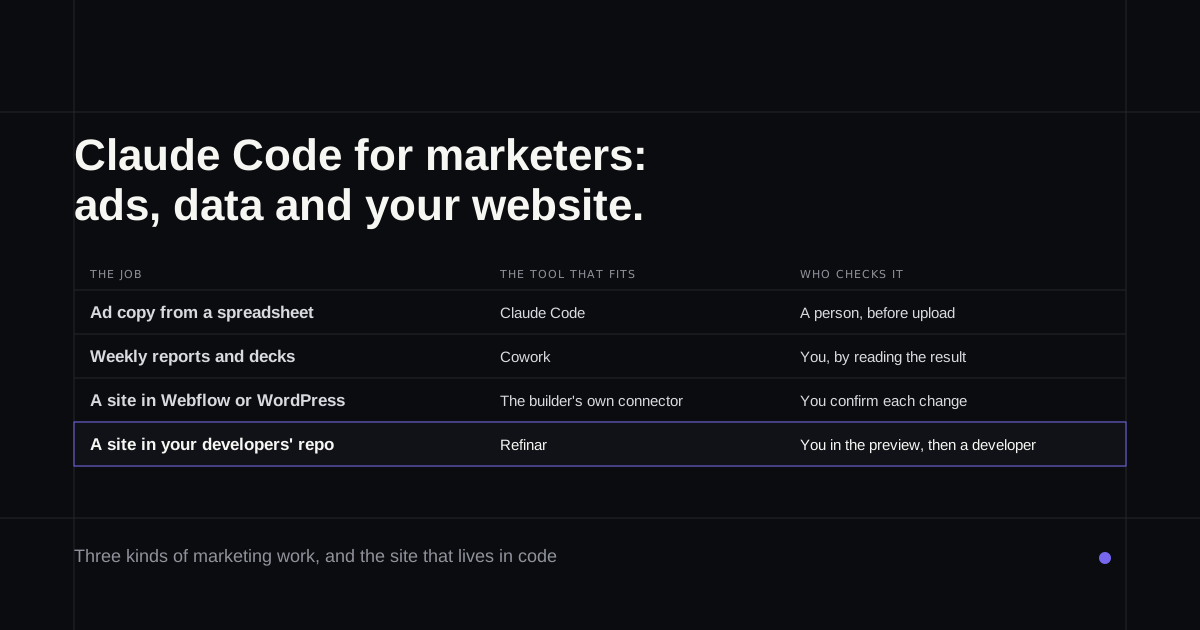
Somebody on your team has read that a growth marketer at Anthropic built his own ad tool without ever having written code, and now the question is whether you should too. Claude Code for marketers is a real option, but it covers three different jobs, and they need different setups: handing it spreadsheets and scripts, using it on a site built in a website builder, and using it on a site whose code your developers keep on GitHub. The first is easy, the second mostly belongs to other tools, and the third is where people get stuck.
If your company site lives in a developers' repository and all you want is to change it safely, the section on that case is the one to read.
What Anthropic's own marketers do with it
The best evidence comes from Anthropic itself. In a January 2026 write-up, growth marketer Austin Lau says he had never written a line of code and had to look up how to open a terminal. Within a week he had a Figma plugin and a command for Google Ads that checks drafts against brand-voice and product-accuracy skills, then exports a CSV of 15 headlines and 4 descriptions per ad. The ads are uploaded after a person reviews them, and the article puts the time saved at "30 minutes per ad now takes 30 seconds".
A field marketer, Adam Ward, uses Claude Code to send every account executive a personalised weekly digest built from the company's data warehouse (August 2026). The useful detail is a failure. When an event had no link in the source sheet, Claude "composed a plausible-looking one that led nowhere". The fix was a hard rule never to invent a URL.
Much of the rest of Anthropic's marketing work now runs in Cowork. Its marketing operations team runs a weekly metrics review there, and Anthropic's own Marketing plugin installs into Cowork first; its SEO audit produces an action plan, not changes to a website.
Claude Code or Cowork?
The split is simple once you see it. If what you want back is a document, a plan or a deck, use Cowork, which works on folders and connected apps without touching code. If what you want back is files in a project, a script or a cleaned data set or a change to a page's code, Claude Code is the tool. Claude Cowork vs Claude Code goes through the difference in detail, including Anthropic's September merge of Cowork into Claude itself.
Marketing jobs Claude Code handles well
Bulk ad copy from a spreadsheet. Give it a CSV of last quarter's ads and their results, ask for new variants of the weak ones, and tell it the limits: Google's responsive search ads allow 30 characters for a headline and 90 for a description. Anthropic's team uses one sub-agent for headlines and another for descriptions, and a person still reviews the output before upload.
Scripts against your marketing tools. Klaviyo's guide for marketers suggests using Claude Code to clean exports and write sync or suppression scripts, tested on test data first. Its advice is to keep Claude in a mode that asks before acting whenever a script can reach a live API. That's the habit worth copying.
Search basics on a site that's in code. When an IT firm moved its WordPress site to Next.js with Claude Code, it wrote a skill that adds page titles, descriptions and preview images, plus a sitemap generator, and every pull request was built with search indexing switched off and checked for broken links before merging (Behaim's write-up, May 2026). That last part matters as much as the skill.
Tracking code, with help. Anthropic's plugin directory lists plugins for analytics tools such as PostHog, and one that reads a codebase and writes tracking calls. Nobody has published a dated case of a marketer doing this alone, so treat it as a job for a pull request a developer reads.
If your site is built in Webflow, WordPress or Framer
Then Claude Code is the wrong door. Those sites keep their pages inside the builder, and the builders now have their own connections to Claude. Webflow's connector, added in January 2026, can point an agent at a page branch so the live site stays as it is until you review and publish (Webflow's listing). WordPress.com's connector says every change is confirmed by you, and it needs a paid WordPress.com plan or a Jetpack-connected site. Framer has no official connector in Anthropic's directory; the one on Framer's marketplace says plainly that it isn't an official Framer plugin.
When the site lives in your developers' repository
This is the common case in software companies, and the one most guides skip. The marketing site is a Next.js or Astro project, a developer set it up, and every new headline is a ticket.
Claude Code can work on it, but here's what has to be true first. In the desktop app, Claude Code works on a folder on your computer, so you need a copy of the repository on your machine and the site's tools installed and running, which usually means asking a developer for setup help and the keys the site expects (desktop quickstart). Once that works, Claude can start the site, look at it in the app's built-in browser after each change, and open a pull request.
Cloud sessions avoid the local setup but bring their own conditions. A private repository needs the Claude GitHub App installed on it, and on Team and Enterprise plans an owner has to switch on the GitHub connection first. The cloud docs describe reviewing a diff and creating a pull request; they don't describe a live preview of your site. There's also the @claude route in GitHub issues, which a repository admin has to set up and which needs you to have write access (GitHub Actions docs).
One more point from Anthropic's docs: Claude Code's rewind doesn't track files changed by commands, and it's "not a replacement for version control". On a company site, the real safety net is the pull request and the developer who reads it.
What tends to go wrong
The failures marketers report are quiet ones. ClickUp's guide lists numbers that drift, so a 12% lift becomes 14%, and edits to the wrong file. Adam Ward's invented link is the same family. Each is caught by a person checking the output against a source before it ships.
The loud failures have involved agents holding production credentials. In one widely reported case from March 2026, Claude Code ran a destroy command during an infrastructure migration and wiped a site's database along with its snapshots, which took AWS about a day to restore. Marketing work rarely needs production keys, so the simplest protection is never to hand them over.
Where Refinar fits
For the site in your developers' repository, Refinar removes the setup half of the problem. It starts the site from its GitHub repository on a cloud machine, so there's nothing to install and no keys on your laptop. You click the headline or section you mean in a live preview, edit the words in place or describe a bigger change like a new campaign page, and watch an AI agent make it. Then you publish it, or send it for review so a developer approves it first.
Some requests wait for a developer however small they look: changing what customers are charged, who can sign in, deleting data, or switching on anything that sends messages by itself. An owner can also give the agent written rules for the site, such as "only change text and images on marketing pages" (Refinar for marketers).
If your site's code is on GitHub and the headline you want has been in the queue for a fortnight, try Refinar on the site.