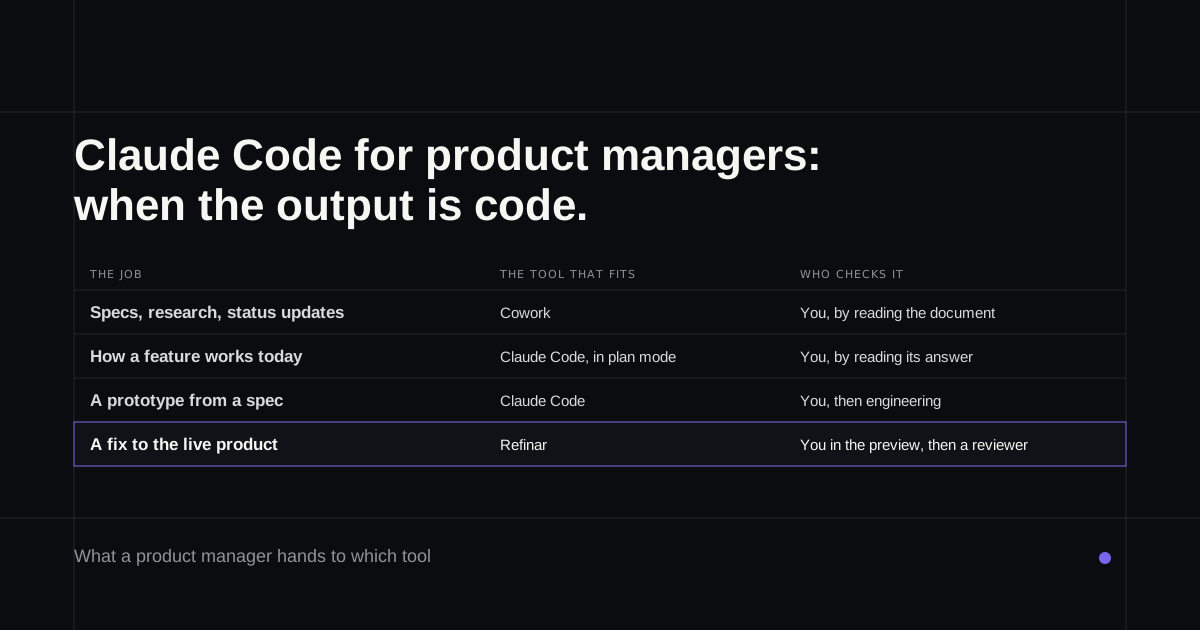
Most guides to Claude Code for product managers show it turning a folder of notes into a PRD. That works, but it isn't how Anthropic's own product people use it. The head of product for Claude Code keeps it for one kind of job, the kind where the output is code, and hands documents to Cowork. That leaves the question most guides skip: what it takes for a PM to change a product that already has customers, and who checks the result before they see it.
If that last part is why you're reading, the final section covers a route that doesn't involve a terminal.
How Anthropic's PMs split the work
In a March 2026 post, Cat Wu, head of product for Claude Code, describes three tools for three jobs. Claude in the browser is a thinking partner. Claude Code is for prototypes, evaluations and scripts, used "when the output is code". Cowork handles the rest, from her inbox and decks to digging up old decisions in Slack. Her tip for the middle one is to hand a finished spec to Claude Code and see whether it can build it.
Another Anthropic PM, Jess Yan, describes researching in Claude and Cowork, then using Claude Code to build against API specs that haven't shipped yet, with a working prototype within an afternoon (April 2026). Anthropic's own Product Management plugin, with commands for specs, roadmap updates and stakeholder notes, is designed primarily for Cowork.
So the honest first step is sorting your work. Specs, research summaries and status updates are Cowork jobs, and Claude Cowork vs Claude Code explains why. The jobs below are the ones where Claude Code earns its place.
Four PM jobs that suit Claude Code
Finding out how the product actually works. Anthropic's best-practice guide says to ask Claude the questions you'd ask a senior engineer. Plan mode reads the code and proposes without editing anything, and cloud sessions can answer code questions without you having a copy on your machine. "What happens when a trial expires?" stops being a Slack thread that waits a day.
Turning a spec into a prototype. The same guide suggests letting Claude interview you about a feature, then writing the answers to a spec file that names the files involved, says what's out of scope and ends with a way to check the result. Claude Design, launched in April, can also package a sketched flow into a handoff bundle that Claude Code builds from (Anthropic's announcement).
Answering data questions yourself. Sachin Rekhi, the founder of Notejoy, describes a skill that turns a plain-English question into a database query, runs it and returns a report with the query shown, so he can see how the number was reached (his write-up, March 2026). Showing the query is the part worth copying.
Small changes to the product itself. Anthropic's guide for startups quotes Parahelp's co-founder saying non-technical people "were also suddenly shipping UI changes". The same guide adds that someone still has to fit those changes into the product, and there's "still a division of labor".
What you need before it touches the real product
Prototypes can live anywhere. Changes to the product your customers use need three things in place, and most of them come from engineering.
The first is access. The desktop app runs Claude Code against a copy of the code on your own machine, which means cloning the repository and getting the app to start locally, keys and all. Claude can then start the app, check its own changes in a built-in browser and open a pull request (desktop docs). The docs warn that the file which tells it how to start the app gets committed, so secrets don't belong in it.
Cloud sessions skip the local setup. They need the Claude GitHub App on the repository, which an organisation owner may have to approve, and on the Team and Enterprise plans the GitHub connection has to be switched on by an owner first. Anyone who uses a cloud environment can read its variables, and the docs end with a diff and a branch, saying nothing about a preview of the running app.
The second is a way to propose the change. If you'd rather work from GitHub issues, the @claude route has to be set up by a repository admin, and out of the box it only answers people who can already push to the repository.
The third is a reviewer. That's a person, and it's worth agreeing who before the first pull request.
The guardrails, and what they don't cover
Claude Code has become safer to hand to a non-engineer. Since version 2.1.283, sessions in the terminal and VS Code start in auto mode, and its default checks block merging a pull request no person has approved, Claude approving its own pull request, production deploys and migrations, and changes to live feature flags (permission modes). Cloud sessions also respect the repository's branch protection. Anthropic still says auto mode "does not guarantee safety".
Anthropic's managed Code Review, on Team and Enterprise, leaves comments on a pull request but doesn't approve or block it, and averages $15 to $25 a review, billed separately.
None of this answers the real gap for a PM, which Anthropic's own research names the "paradox of supervision": checking Claude's work takes the coding skill that leaning on it can wear away (December 2025). A diff you can't read is a diff you can't judge.
If the product already has customers
For changes to a live product, the useful check is the product itself, running, with your change in it. That's what Refinar is built around. It runs your app in the cloud straight from GitHub, so there's nothing to clone or configure. You describe the change or select the element you mean in the preview, watch an AI agent make it, and rewind anything you don't like before it's published.
When it looks right, publish it or route it to a reviewer you name. An owner can set the app so changes need approval first, and give the agent written rules for what it may touch. The agent also stops by itself before it edits who can sign in, changes what customers are charged, deletes data or turns on anything that contacts the outside world. You can then build the safe part, or hand it to a developer as a request with a GitHub issue attached. Ideas you're not ready to ship can start as a prototype on the live app and go to a developer with a written implementation plan (Refinar for product managers).
If there's a list of small product fixes waiting behind bigger work, try Refinar on your app and start with the oldest one.