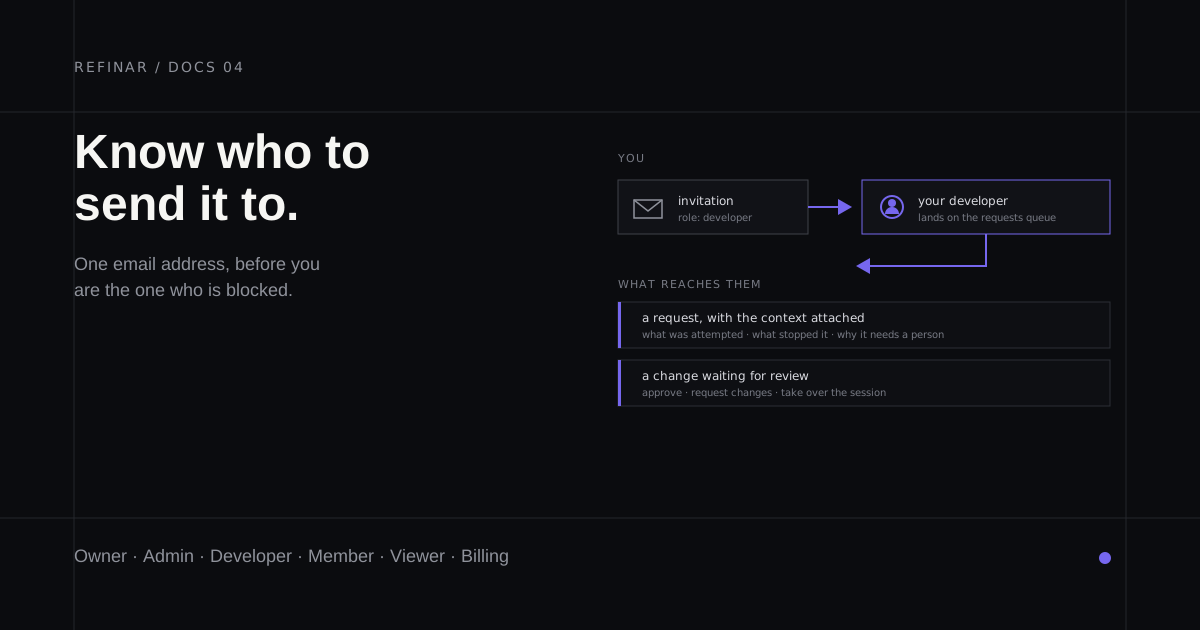
Refinar is built so that someone who does not write code can make real changes to a real app. That works because of where the line is drawn, not because the line is absent. Some changes need a developer, and the product is designed to reach one rather than pretend otherwise.
Inviting a developer early is worth doing even if nothing currently needs them. An invitation costs an email address. A blocked change with nobody to send it to costs an afternoon.
When you actually need one
Three situations come up repeatedly.
Setup stalls. Connecting GitHub needs someone with admin rights on the organisation, or you are not sure which repository is the live one. Every step of setup carries a quiet "invite your developer" link underneath for exactly this.
A credential has to be handed over. Only a developer or an owner can connect a service, because deciding which key an automated system may use is a judgement call with consequences.
A change is out of bounds. Some work is genuinely riskier than a preview can prove safe — a database migration, an authentication change, anything touching money. Refinar stops and offers to write up what it found instead of pushing through. That write-up needs a recipient.
Sending the invitation
There are two places to send one, and they do slightly different things.
From within setup, the Invite your developer link opens a small dialog asking for one thing: their email address. The role is fixed to developer, and when they accept they arrive at the app you were setting up, at the point you stopped. Nothing else about your team is exposed by that dialog.
From the Team page you can invite anyone and choose their role. This is the route to use when you are adding a colleague who is not a developer, or when you want someone in a narrower role. Invitations are sent as a one-time email, and a pending invitation stays listed until it is accepted so you can see what is outstanding.
What each role can do
Six roles exist. Most teams need three of them.
| Role | What it is for |
|---|---|
| Owner | The person who created the team. Everything, including deleting it |
| Admin | Runs the team day to day. Everything an owner can do except delete the team |
| Developer | The reviewer. Approves changes, connects services, and takes over a session |
| Member | Asks for changes, previews them, publishes, and sends work for review |
| Viewer | Reads sessions and their output. Changes nothing |
| Billing | The plan and the invoices, and nothing else |
If you are the non-technical person driving the work, you are a member or an admin. The developer you invite is a developer.
What a developer can do that a member cannot
A member is not a limited user. A member can ask for changes, run the checks, publish, and share work for review. Most days that is the whole job.
A developer adds the parts that need someone who can read the code and judge the result:
- Approve a change, or send it back with requested changes
- Take over a session that another person started
- Connect a service, and set the policy for what the agent is allowed to do
- Run shell commands and open diagnostics inside the preview
- Publish work that is deliberately incomplete, when that is the right call
- Claim a request, and correct one that was written up wrongly
There is a deliberate split in how requests move. Anyone who can ask Refinar for a change can also say a change needs a developer, and can say which developer — that is the requester's knowledge, and it is fully reversible. Only a developer can claim a request, because claiming means "I am doing this."
What their first minute looks like
A developer signing in does not land where you land. Members open the home screen and their apps. A developer opens the requests queue, because the queue is the reason they are here.
That means a request you assign is waiting for them the moment they arrive, with the context already attached — what was attempted, what stopped it, and why it needs a person. They are not starting from a message that says "can you look at this."
Keeping the invitation narrow
Two habits are worth forming.
Invite people into the role they need rather than the role that avoids future friction. Admin is close to owner; it is not a polite default for a contractor. Someone reviewing your accounts wants billing, not admin.
Remove access when an engagement ends. Removing a member is immediate, and their work stays exactly where it is — the branches, pull requests and history live in your GitHub repository, under your account, not inside Refinar.
Related
- Publish a change, or share it for review — the workflow a developer plugs into
- Connect a service your app uses — the first thing a new developer is usually asked to do