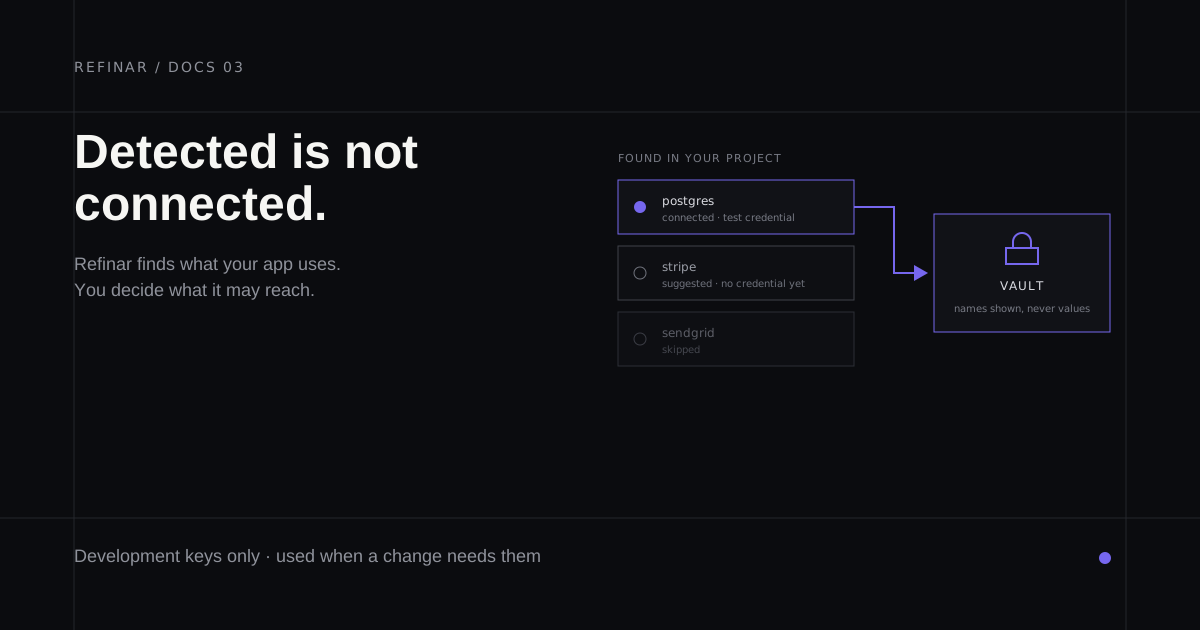
Most real apps are not self-contained. They talk to a database, a payment provider, an email sender, an AI model. When Refinar prepares a preview of your app, those services are the parts it cannot invent.
So during setup it looks at what your project already uses and shows you the list. Nothing is connected for you, and nothing is changed. The scan reads your project and reports what it found.
What the scan does and does not do
Refinar recognises a service from the evidence already sitting in your project: the packages it installs, the configuration files it carries, and the names of the environment variables it expects. That is enough to say "this app uses Stripe" without ever holding a Stripe key.
The scan does not contact any of those services, and it does not read the values of your credentials — only the names of the settings your code refers to. If it finds nothing, that is a normal result and not a failure. Plenty of apps genuinely have no outside dependencies.
Each service it finds lands in one of three states.
| State | What it means |
|---|---|
| Suggested | Found in your project. No credential given, so Refinar cannot use it |
| Connected | A credential is stored. Refinar can use this service in a preview |
| Skipped | You decided this one is not needed. It stays out of the way |
A suggested service is not a warning. It is a note that if a future change touches this part of your app, Refinar will need permission first.
Connect a service only when a change needs it
There is no benefit to connecting everything up front. Refinar only needs access to a service when a change actually exercises it, and an unused credential is a credential sitting somewhere for no reason.
The practical rule: leave a service suggested until a preview fails because of it, or until you already know the change you are about to ask for depends on it. Connecting takes under a minute and can be done at any point.
Use a development credential, never a live one
This is the part of the guide worth reading twice.
The credential you paste in should be a development or test key. Not the key your live app uses. Most services hand these out freely — Stripe has test keys, most databases can run a disposable branch or a local copy, most APIs offer a sandbox mode.
The reason is direct: a preview is a working copy of your app, and anything your app can do with a credential, the preview can do too. A live database key means a change under review can write to your real customer data. A test key means the worst case is a mess in a throwaway environment.
Refinar's own guidance on connecting a custom service says the same thing plainly: the agent can read this value. Treat every credential you paste as one you have handed to an assistant working on your behalf, because that is what it is.
What happens when you save one
Refinar tries the credential against the service before storing it, so a typo fails here rather than forty seconds into a change as an unexplained error.
That check is deliberately forgiving. Only an outright rejection — the service saying this credential is not valid — stops the save. A timeout, a network problem, or the service being briefly down does not, because refusing a perfectly good credential because someone else is having a bad afternoon is the wrong trade. In that case the credential is saved and marked unverified, and Refinar tries it again when the next preview starts.
Either way the value goes into a vault. The settings screen lists the names of what is stored and never shows a value back to you, including to the person who entered it.
New credentials take effect when the next preview starts, not in a preview already running. If you connect a service mid-session, restart the preview to pick it up.
Services your app reads directly
There are two related but separate things in Refinar, and mixing them up causes confusion.
Connected services are what this guide covers: outside providers Refinar itself may need to reach while working on your app.
App credentials are the environment variables your own code reads at runtime — the settings your app would need on any server to boot. Those live on their own screen, and they are also stored in a vault with only their names displayed.
If a preview boots but a feature inside it fails, app credentials are usually the missing piece. If Refinar cannot complete a change at all, a connected service usually is.
Who can connect one
Credentials are team-wide. Anyone on your team can work with a service once it is connected, but only a developer or an owner can add or remove one.
If you open the services screen and the controls are read-only, that is the reason — you can see what was detected and what state each service is in, but the connect action belongs to a developer. That separation is intentional: deciding which key gets handed to an automated system is a judgement call with a real blast radius.
If your team does not have a developer yet, invite one. It takes an email address.
A service that is not on the list
Refinar knows a catalogue of common providers by name, and for those it can check the credential and, where useful, install that provider's own command line tool inside the preview so the agent can talk to it properly.
For anything outside that catalogue you can still add a credential by hand. Refinar cannot verify a custom credential — it has no idea what the service expects — so check the name and the value carefully before saving. A wrong custom credential fails silently until something needs it.
Next
With your app connected and its services in a state you are happy with, the remaining question is who else belongs in this: invite a developer to your team.