Learning how to edit a website is easy once you know one thing: what the site is built with. Every platform has its own edit button, its own idea of when a change goes live, and its own way of undoing a mistake, and some have no undo at all. Many guides that rank for this question teach you to edit a page in your browser's developer tools, which changes nothing for anyone else and disappears when you reload. This guide starts with finding out what your site runs on, then shows where and how to edit safely on each platform, using their own help pages as of 12 October 2026.
If your site was built in code, by a developer or an AI builder, the section on code-built sites covers how to change it without learning to code.
Step 1: find out what the site is built with
Start with your email. Search it for renewal invoices from Wix, Squarespace, Shopify, Webflow, Framer, WordPress or a host such as WP Engine, Vercel or Netlify. The company billing you for the site is usually where it's edited. The domain registrar is a different thing: ICANN's free Lookup tool tells you who registered the domain, which isn't always who hosts the site.
If the emails don't settle it, open your site, view the page source (Ctrl+U on Windows, Option+Command+U on a Mac) and search for these clues:
| You find | The site is on |
|---|---|
wp-content, or a generator tag saying WordPress | WordPress |
Wix.com Website Builder | Wix |
This is Squarespace. | Squarespace |
cdn.shopify.com | Shopify |
| A generator tag saying Webflow or Framer | Webflow or Framer |
/_next/static/, and no generator tag | Built in code, usually Next.js |
Free tools do the same in one click: BuiltWith is free for single lookups, and Wappalyzer's free account includes 50 a month. For scale, W3Techs counts WordPress on 40.1% of all websites, Shopify on 5.4%, Wix on 4.2% and Squarespace on 2.4%, while 31.6% use no system it can detect, a group that includes sites built in code (W3Techs).
Step 2: know when "save" means "live"
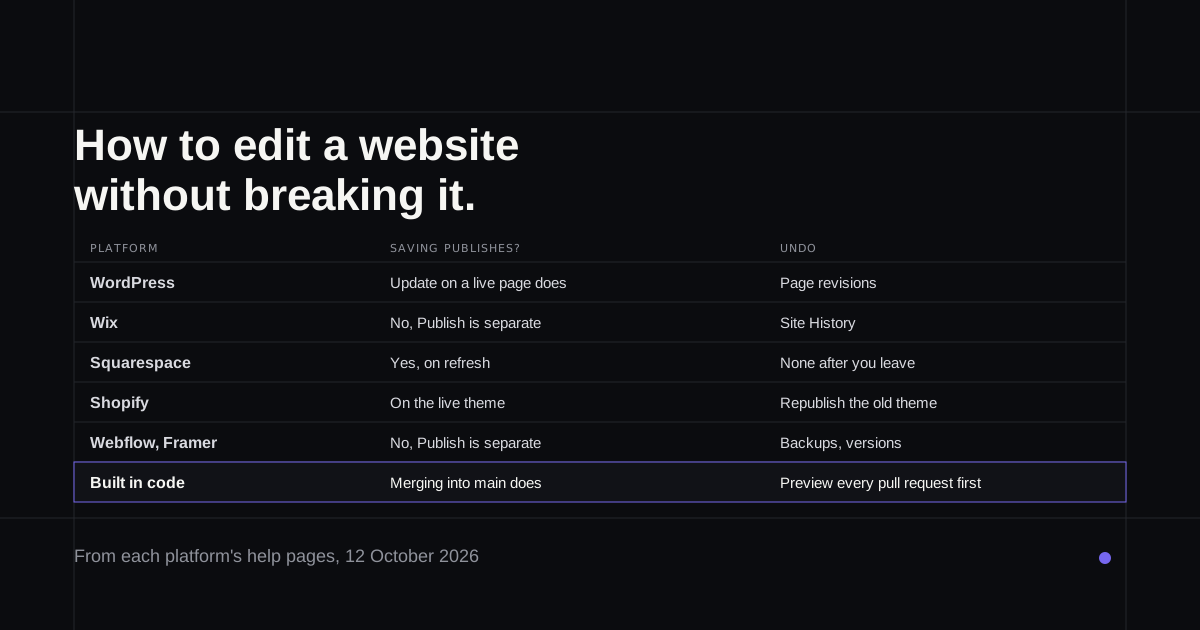
This is where most website edits go wrong. On some platforms, saving a change on a live page publishes it to every visitor straight away.
| Platform | Saving publishes? | Test copy | Undo after publishing |
|---|---|---|---|
| WordPress | Updating a published page does | Staging on WordPress.com Business and Commerce | Revisions, page content only |
| Wix | No, Publish is separate | Test site, after the first publish | Site History restores the whole site |
| Squarespace | Yes | Duplicate the site, which never syncs back | None after leaving the editor |
| Webflow | No, Publish is separate | The free .webflow.io address | Backups |
| Shopify | On the live theme, effectively | Duplicate the theme | Republish the old theme |
| Framer | No, Publish is separate | Staging, with a custom domain | Roll back to a published version |
Step 3: edit on your platform
WordPress. Pages and posts change in the block editor; the header, footer and menus change in the Site Editor under Appearance. On a published page, your edits autosave but don't go live until you press Update. If something goes wrong, the Revisions panel restores an earlier version of that page's content, though not plugins or theme settings (WordPress.com). Business and Commerce plans can make a staging copy; WordPress warns that syncing a shop's staging copy back over the live one can lose orders permanently (staging).
Wix. Wix saves as you work and publishes only when you click Publish, so you can check a change in Preview first. Site History lists every save and publish with who made it, and restores the site to any of them, erasing everything after (Wix).
Squarespace. Be most careful here. Saved edits are public as soon as a visitor refreshes, and Squarespace says it has no auto-save or revision history, so once you leave the editor a change can't be undone (Squarespace). Premium and Enterprise plans can draft a page before publishing it. For a bigger change, duplicating the whole site gives you a copy to experiment on, but nothing syncs back, so you redo the change on the live site by hand.
Webflow. Content editors change text and images in Edit mode without touching the design. You can publish to the free .webflow.io address first, check it, then publish to your real domain, and site managers can restore earlier backups.
Shopify. Duplicate your theme before anything significant, edit the copy, preview it, then publish it. Undo works only until you save, and if the new theme misbehaves you republish the old one from Draft themes (Shopify).
Framer. Edit, check the list of changes with who made them, then Publish. Each publish creates a version you can roll back to.
If the site was built in code
Plenty of websites run on no platform at all. They live as code in a GitHub repository and go live through a host such as Vercel, Netlify or Cloudflare Pages, which publishes whatever lands on the main branch. That includes most sites built by a freelancer, and apps built with Lovable or Bolt once their code syncs to GitHub.
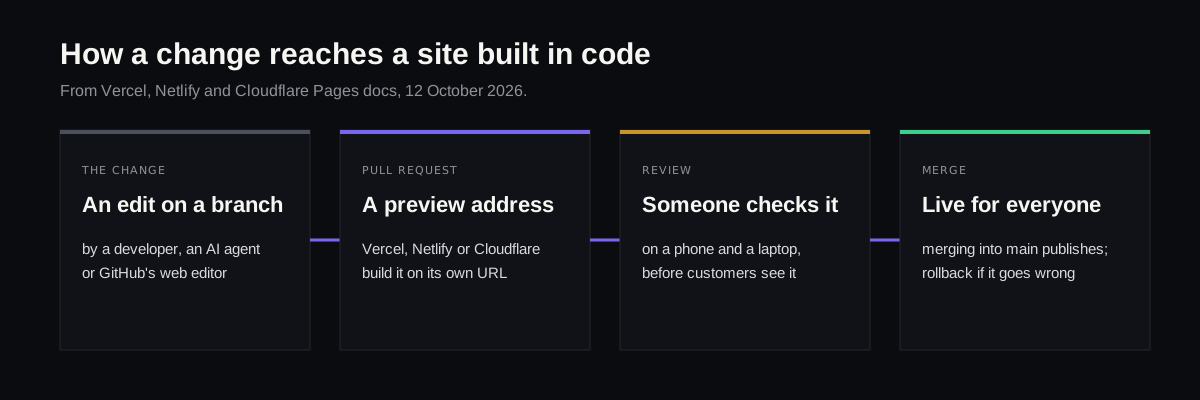
There's no editor screen here, but there is a safe path. Each change goes on a branch as a pull request, and Vercel, Netlify and Cloudflare Pages build every pull request at its own preview address, so you see the change before customers do (Vercel, Netlify). Merging it publishes it. You can even edit a file in the browser on GitHub, but committing straight to main publishes it with no preview at all.
Refinar is built for people in this position who don't code. It opens the site's repository, runs it in a live preview, and lets you describe the change, or click the heading or button in question, while an AI agent makes it. You publish it yourself or send it to a developer for review, and changes to sign-in, payments or customer data always go to a developer first (how it works). It works with any site in GitHub, not with Wix, Squarespace or Shopify's own editors.
Before any edit, on any platform
- Make a copy you can go back to: a revision, a duplicate theme, a backup or a branch.
- Check the change on a phone and on a laptop, since layouts break differently.
- Change one thing at a time, so you know which edit caused a problem.
- Leave sign-up forms, checkout and anything with customer data to whoever set them up, or test them with a real purchase afterwards.
A 2021 Yell survey of UK small businesses found 30% of owners didn't update their site because they were afraid of breaking it, and the average site had last been updated 15 months earlier (Yell). Knowing where the undo button is usually fixes that.
If your site lives in GitHub and every change waits for a developer, try Refinar on it with the edit you've been putting off.