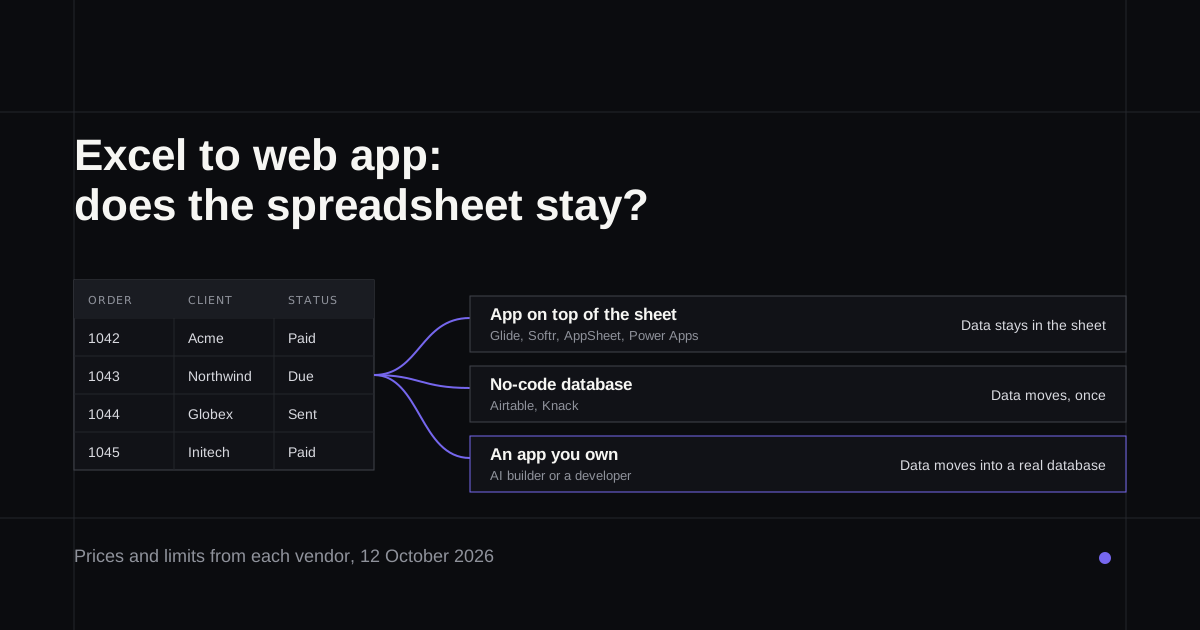
Most businesses that want to turn Excel into a web app aren't really after an app. They want the spreadsheet to stop being emailed around, to stop breaking when two people edit it, and to show each person only the rows they should see. Which route gets you there depends on one decision most guides skip: does the spreadsheet stay where it is, or does the data move into a proper database? This guide walks through both, with each vendor's own prices and limits as of 12 October 2026.
If you already know you want an app built properly, with sign-in and permissions, the last section covers a fixed-price build.
Signs the spreadsheet has outgrown itself
A spreadsheet is a fine database for one careful person. It struggles once a team depends on it.
- Several people edit it at once and changes collide or vanish.
- Some people shouldn't see some rows, like salaries, other clients or other branches, and sharing the file shows everyone everything.
- The same data gets typed twice, into the sheet and into an invoice or an email.
- Mistakes cost money. Raymond Panko's audits of real spreadsheets found serious errors in most of them (his summary).
The limits are real too. Excel stops at 1,048,576 rows per sheet (Microsoft) and Google Sheets at 20 million cells per file (Google). In October 2020, Public Health England left 15,841 positive COVID cases out of its daily figures because an old Excel format ran out of rows (BBC). Most businesses never hit those numbers, but the app tools in this guide have much lower ones, as the table below shows.
The first decision: does the spreadsheet stay?
Keep the sheet, put an app on top. Tools like Glide, Softr, AppSheet and Power Apps read and write your existing spreadsheet. Nothing moves, and people who like the sheet can keep using it. The cost is that the sheet is still the database, with the limits and the risks of one, and some tools change it: Softr adds an ID column you mustn't delete (Softr's docs), and Microsoft warns against editing the Excel file by hand while an app writes to it (connector docs).
Move the data into a database. Airtable, Knack, AI app builders and custom apps import the spreadsheet once, and from then on the database is the source of truth. You lose the familiar grid, but you gain real permissions and room to grow.
The routes, side by side
| Route | Data lives in | Price | Limit to know |
|---|---|---|---|
| Glide Classic | Your sheet, synced | Business from $199 a month with 30 users | 25,000 rows from spreadsheets, on every plan |
| Softr | Your Google Sheet, synced | $19 to $329 a month, capped app users | Records and users by plan |
| AppSheet | Your sheet | $5 to $20 per user a month; Core in most Workspace plans | 2,500 rows per table in its own database, below Enterprise |
| Power Apps | Excel table in OneDrive | $20 per user a month; limited rights in some Microsoft 365 plans | 2,000 records per query at most, 25 MB file |
| Airtable | Airtable, after import | $20 or $45 per editor a month, yearly | 50,000 records per base on Team |
| Knack | Knack, after import | From $49 a month yearly, unlimited users | 20,000 records on Starter |
| AI app builder | A real database, after import | Credits or tokens, mostly not per seat | Whatever the database holds |
| Custom build | A database you own | Project fee | Whatever the database holds |
Prices are from each vendor's pricing page, billed yearly where that's how they quote it.
Glide now sells two products: Glide Classic, the spreadsheet tool, and GlideOS, a newer AI platform priced by team members and credits (Glide pricing). Lovable, Replit and Base44 all import a CSV or Excel file into a database when you ask; Replit has a dedicated spreadsheet import that builds the app around your columns (Replit's docs).
What a team of 25 pays
Per-user pricing is the cost most guides leave out, and it decides the bill as soon as the whole team needs a login.
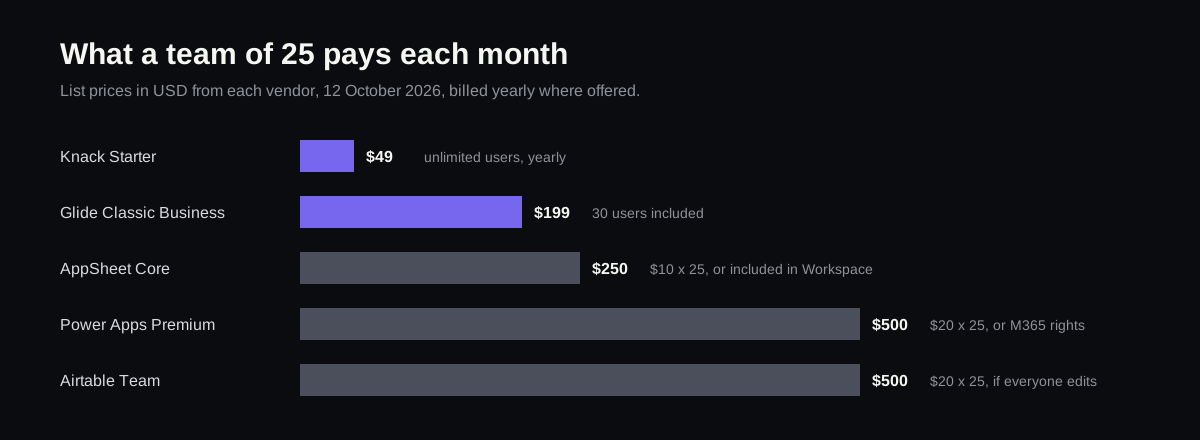
AppSheet Core costs nothing extra if you're already on most Google Workspace plans, and Power Apps can cost nothing if your Microsoft 365 licence covers it and you stay within its standard connectors. Airtable charges only for people who can edit, so a team that mostly views pays less. Knack and the AI builders don't charge per user at all, which is why they get cheaper as the team grows.
Where each one runs out of rows
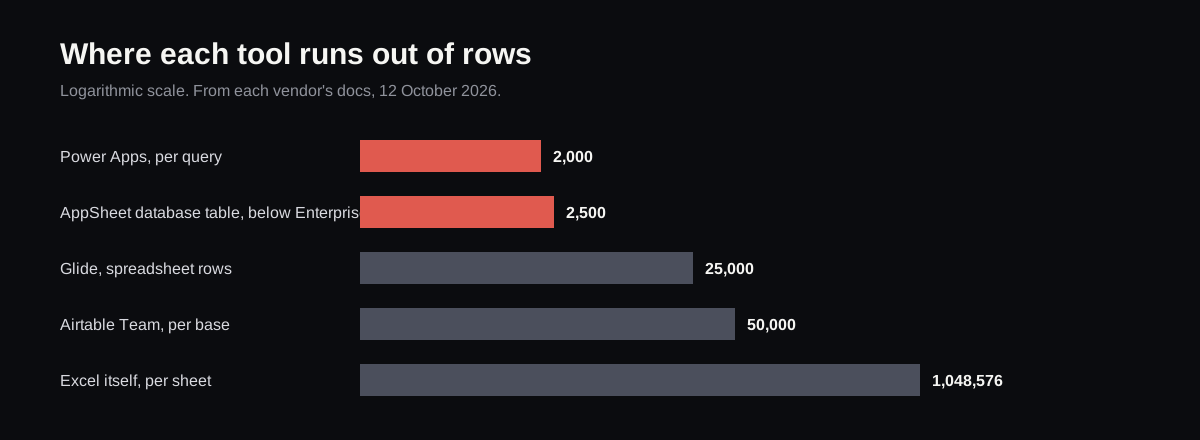
The Power Apps figure catches people out. By default an app loads only the first 500 records from a source like Excel, and 2,000 at most for queries the source can't filter itself (Microsoft). A sheet of 5,000 orders can look half empty in the app with no error at all. Glide is clearer: past 25,000 spreadsheet rows, syncing becomes unreliable.
Which route, by situation
- A small team, one sheet, simple forms: AppSheet if you're on Google Workspace, Power Apps if you're on Microsoft 365.
- Clients or staff outside the company need their own login: Softr or Glide, keeping the sheet; check the user caps first.
- The data has outgrown the sheet: Airtable for a team that edits, Knack for many people who mostly view.
- You want an app you own, that can keep changing: an AI app builder, or a developer.
Before you start
- Keep a dated copy of the spreadsheet somewhere nobody edits.
- One table per sheet, with one header row and no merged cells. Every tool imports cleaner data more cleanly.
- Give every row an ID that never changes, like an order number.
- Write down who should see what. Permissions are the main reason to build the app, and the easiest thing to get wrong.
Having it built, and changing it afterwards
If the spreadsheet runs something important, like orders, bookings or client records, it can be worth having a developer build the app properly once. Refinar's Foundation build does that for a fixed $1,000 in 3 business days: sign-in, database rules so one customer can't read another's records, payments, email notifications and SEO, delivered as a GitHub repository in your own account (what's included). Moving your existing spreadsheet data across is quoted separately, before any work starts.
From then on, the app is one Refinar can change. Whoever runs the process describes a change in plain words, or clicks the part of the screen they mean, and watches an AI agent make it in a preview of the app. Changes to sign-in, payments, or anything that would delete records are held for a developer to approve first (how it works).
If your spreadsheet has started running the business, see what the Foundation build includes and send the sheet's columns with the brief.