Base44 makes it quick to start an app and slow to work out what you own once it's running. Look up how to export a Base44 app and you'll find a ZIP button and a GitHub sync, but Base44's own docs say the exported code "still relies on Base44 to run". This guide goes through each way out as it stood on 28 November 2026, what each one moves, how to get the records out, and what a full move to your own stack involves.
If porting looks like more work than starting over, the last section covers Refinar, which builds an app from a description as ordinary code that ends up in your GitHub account.
Four ways to export a Base44 app
GitHub sync
Base44's GitHub integration is a two-way sync, and it needs the Builder plan or higher, which is $50 a month or $40 a month billed yearly (GitHub integration). Only the owner can connect it. Base44 creates a new private repository in the account or organisation you choose, and from then on every change in Base44 lands on main, while whatever you merge into main flows back into the editor.
The default branch has to be called main, and the sync can't be paused, only disconnected. Version History can't restore anything older than the moment you connected, so roll back first if you need an earlier version. Conflicts between an edit in Base44 and a commit on GitHub get resolved with AI, which costs credits.
ZIP download
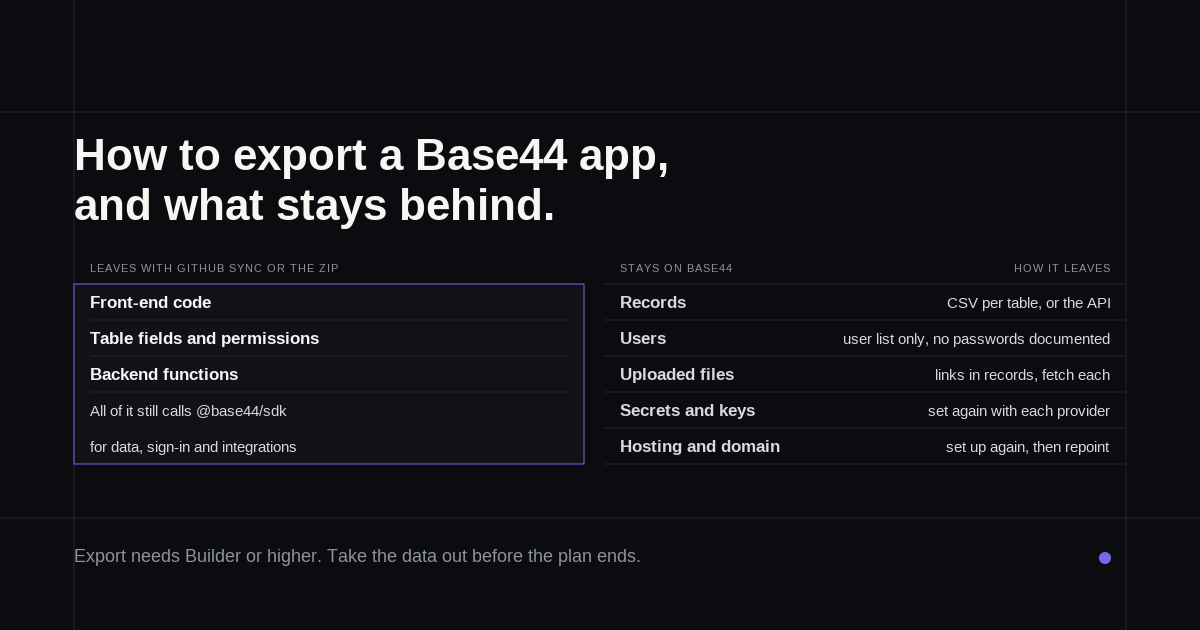
In the app editor, More actions and then Export project as ZIP downloads the current saved code (developer tools). It also needs Builder or higher and a computer, and it doesn't appear for apps that were imported from GitHub. The ZIP carries the front end, the backend functions and each table's fields and permissions. The records, the app's users, its secrets and its version history are left out.
The Apps API
For scripts, the Apps API downloads the same ZIP for any branch, syncs GitHub and reads every table's records, authenticated with a personal access token (Apps API overview). Base44's November developer changelog added workspace API keys, which outlive a teammate leaving but need a Business or Enterprise plan, and nine Base Code endpoints for branches, commits and pull requests. Those work on repositories imported into Base Code, so they're tools for working alongside Base44 rather than for leaving it.
Moving the app to another account or workspace
A transfer keeps the app on Base44 with its data, users and address intact (managing workspace apps). Inside one workspace, the owner picks Make app owner next to a collaborator, on any plan. Sending an app straight to someone outside the workspace needs Business, Enterprise or Base44 Partner status.
Otherwise, the new owner invites you into their workspace as an editor, you move the app there, and then you make them its owner. The same steps move an app between two accounts of your own. You need to own the current workspace, and the move disconnects GitHub sync and custom connectors and switches off workspace SSO sign-in. For each secret, you choose whether its value goes across or the new owner enters a fresh one.
The CLI's base44 eject sounds like an exit, but it copies the app into a new Base44 project with an empty database (eject).
What the exported code still needs from Base44
Open package.json and you'll find @base44/sdk. Data, sign-in, uploads, email, AI and backend functions all go through that SDK to Base44's servers. Base44 says it doesn't support self-hosting, so running the app elsewhere means replacing its database, login system and integrations and rewriting the code that calls them.
Apps created since 19 October 2026 use TanStack Start, a server-rendered React framework built on Vite, while older ones use React Router (project structure). In both, the base44/ folder holds your tables as entities/*.jsonc and each backend function under functions/. Only Base44's backend runs those files, but they make an exact spec for a rebuild.
The data layer is NoSQL, so records can hold nested fields and lists, which shapes the work of moving them into Postgres.
What stays behind
| Part of the app | In the export? | How it leaves |
|---|---|---|
| Front-end code | Yes | ZIP or GitHub |
| Table fields and permissions | Yes, as config files | ZIP or GitHub |
| Backend functions | Yes, as code that calls Base44 | ZIP or GitHub |
| Records | No | CSV per table, or the API |
| Users and sign-in | No | User list by API or CSV; no documented way to take passwords |
| Files people uploaded | No | Links sit in records; each file is downloaded separately |
| Secrets and keys | No | Copied from each provider and set again |
| Hosting, domain and email sending | No | Set up again, then the domain is repointed |
| Version history | No | Only the commits made since GitHub sync began |
Files uploaded through the live app are stored as links inside records (media), so a short script has to fetch each one while Base44 still serves them.
Getting the data out
Records leave one table at a time from Dashboard, Data, the table, More actions and Export (managing data). With a search or filter on, the menu exports only the matching rows, so clear it first. The dashboard displays at most 5,000 rows, but the CSV holds all of them.
A script can also page through each table as JSON with the API's List entity records endpoint, which keeps nested fields intact better than a CSV (entities API). The List app users endpoint returns only people who have signed in, and Base44 documents no way to take passwords out, so plan for every user to set a new one or sign in with Google on the new app.
Do this while the paid plan is still running. Base44's terms of service say it doesn't guarantee access to your data once a subscription ends and may delete it, and a lapsed account falls back to Free, which can't export code.
Moving to your own stack, step by step
- Connect GitHub or download the ZIP, then export every table.
- Search
src/for every use of the Base44 client and note what each call does. That list is the real size of the job. - Pick a Postgres database, a sign-in service, hosting, email and file storage.
- Turn each entity file into a table, and its permission rules into database policies or server checks.
- Rewrite the data calls and backend functions against the new services.
- Import the records and files, then fix the file links.
- Create the user accounts and send everyone a link to set a password.
- Add the payment, email and AI keys and test a real payment.
- Run both apps side by side, move the domain, and cancel Base44 last.
For a small app, around five tables with email sign-in and one or two integrations, expect roughly one to two weeks of a developer's time. Dozens of backend functions, AI agents or payments can push it past a month. Those are rough figures, and the list from step 2 is the best predictor for your app.
Should you leave at all?
Staying is reasonable when the app is internal or quiet, the credits last the month, and nobody needs the code to run elsewhere. GitHub sync alone gives you a copy of the code and lets a developer edit it in their own tools while the app keeps running on Base44.
Leaving makes more sense when integration credits run out every month, when a client asks where the data lives and who may train on it, or when the app needs something Base44 can't do. The Leaving Base44 page covers the June 2026 terms, the Base44 review covers what each plan buys, and Base44 alternatives compares other places the app could go.
Rebuilding on Refinar instead
Nobody has shown Refinar running a plain Base44 export, because the exported app's data and sign-in would still come from Base44. So moving a Base44 app to Refinar means rebuilding it: you describe the app, Refinar generates a fresh codebase with its own sign-in and a Postgres database, and you import the records you exported. The entity files and the list from step 2 make a good description, since they name every table, field and action the app needs.
The code moves to your own GitHub account when the app goes live. Later changes are described in plain language, shown in a live preview and can be undone until they're published. Anything touching sign-in, payments, customer data, the database or keys is built and flagged, and on a team with a reviewer it waits for that person's approval before it goes out. Each plan has room for 20 teammates and hosts one site on a domain you own; the price depends on your country (pricing).
To rebuild a Base44 app this way, start with a description of it on Refinar.